Camunda 8 reference architectures
Reference architectures provide a blueprint for designing and implementing scalable, robust, and adaptable systems. The reference architectures published here help enterprise architects, developers, and IT managers streamline deployments and improve system reliability.
Overview
Reference architectures are not a one-size-fits-all solution. Each organization has unique requirements and constraints that may require modifications to the provided blueprints.
Use these reference architectures as a starting point for your Camunda 8 implementation. Adapt them to ensure they align with your goals and infrastructure.
Target users
- Enterprise architects: Design and plan the overall system structure.
- Developers: Understand the components and their interactions.
- IT managers: Ensure the system meets business requirements and is maintainable.
Key benefits
- Accelerated deployment: Predefined best practices simplify setup, reducing time and effort to deploy a reliable workflow automation solution.
- Consistency: Standardized components and configurations reduce errors and simplify maintenance.
- Enhanced security: Incorporates best practices for securing Camunda 8 deployments, including encryption, authentication, and access controls.
Support considerations
Deviations from the reference architecture are expected. However, changes can introduce additional complexity, making troubleshooting more difficult. When modifications are required, document them to support future maintenance and troubleshooting.
Camunda publishes supported environments to help you navigate supported configurations.
Architecture
Deployment topology
A Camunda 8 Self-Managed deployment is built around one management plane, made up of Camunda Hub and Management Identity. The management plane serves one or more Orchestration Clusters, for example one per environment such as development, integration, and production. Each Orchestration Cluster hosts one or more Physical Tenants, including the default tenant, and each tenant is served by its own Optimize instance.
Each Orchestration Cluster is deployed, scaled, and upgraded on its own schedule, while the management plane maintains the cluster inventory and Management Identity permission and role configuration. With Keycloak, Management Identity also provisions workload clients. With Microsoft Entra ID or another generic OIDC provider, operators provision workload clients separately.
Physical Tenants isolate data within a cluster, and the topology is fully declarative, so it fits GitOps tooling such as Argo CD or Flux.
To implement this topology on Kubernetes, see install the deployment topology.
Management plane vs Orchestration Cluster
When designing a reference architecture, it's essential to understand the differences between the management plane and the Orchestration Cluster. These components serve different purposes, include distinct elements, and are deployed separately.
Management plane
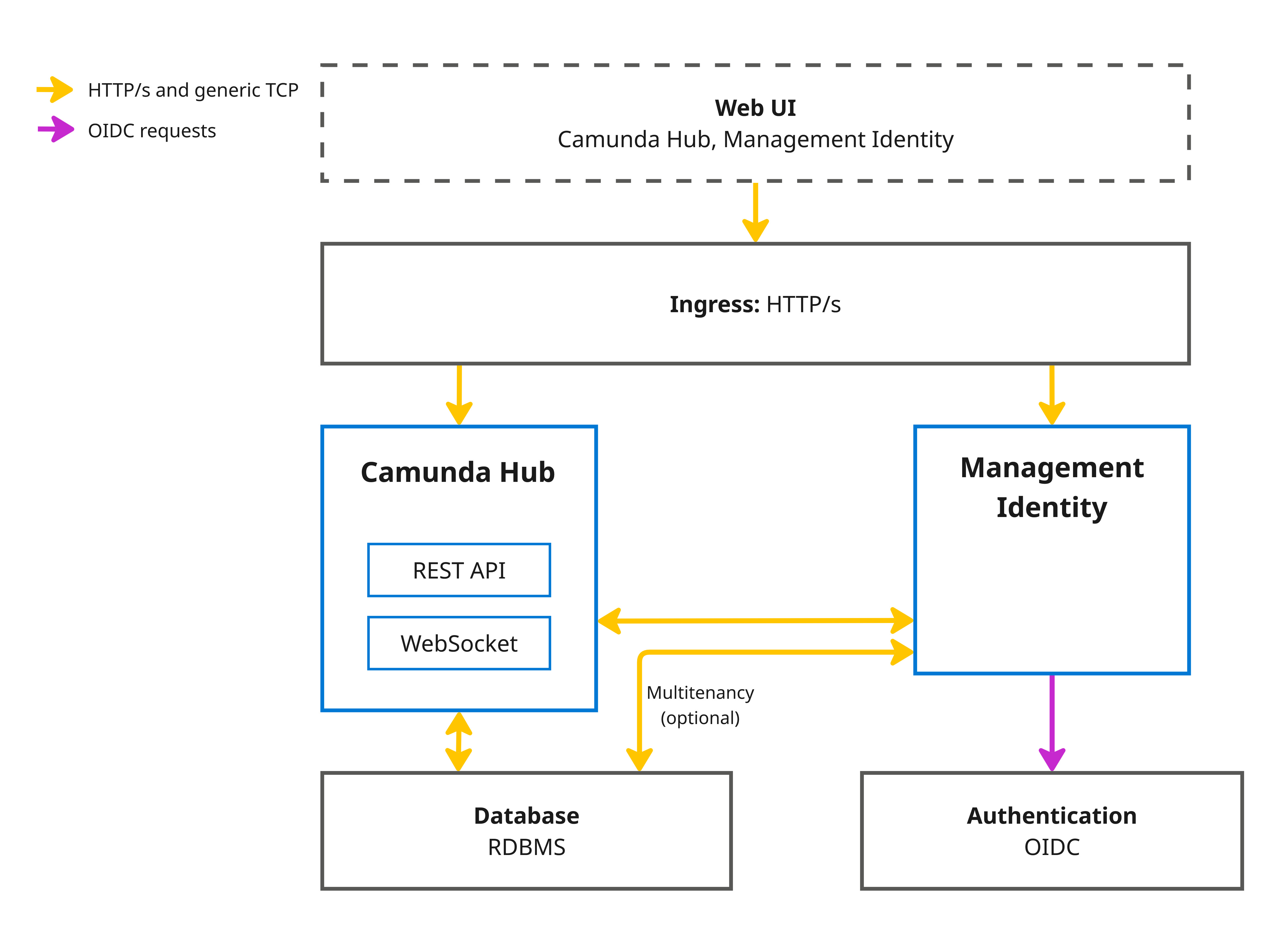
The management plane can connect to multiple Orchestration Clusters across environments, such as development, integration, and production. It consists of:
- Camunda Hub: Manage organizational resources, analyze operations and business value, and deliver agentic processes at scale.
- Management Identity: Centralized authentication and authorization service.
Camunda Hub uses a separate Management Identity deployment, distinct from the embedded Admin in the Orchestration Cluster. Optimize also requires Management Identity and cannot use the embedded Orchestration Cluster Admin.
Orchestration Cluster
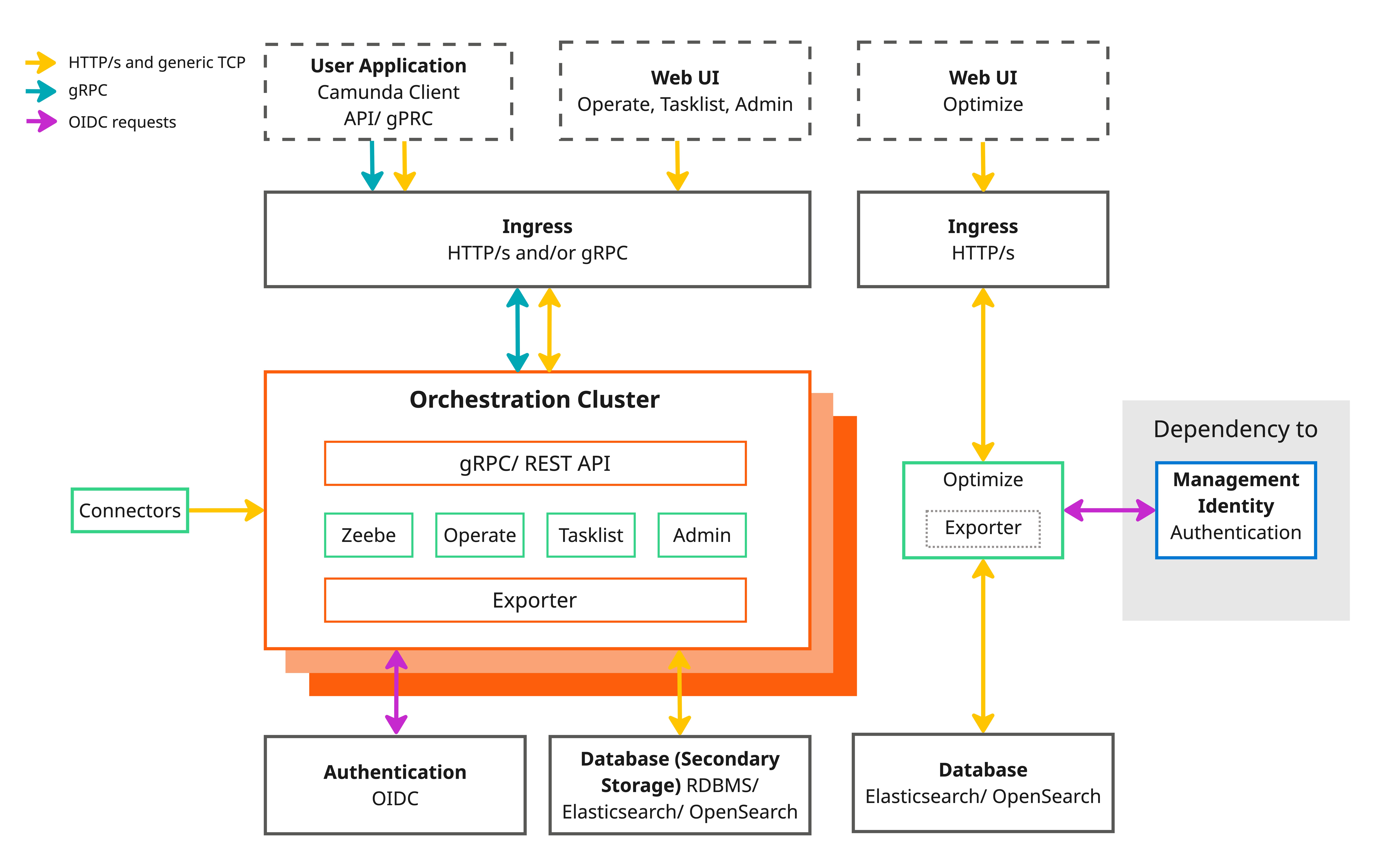
The Orchestration Cluster is the core of Camunda.
Zeebe, Operate, Tasklist, and Admin are bundled into a single artifact:
- Zeebe: Highly scalable, cloud-native workflow engine that tracks the state of active process instances and drives business processes from start to finish.
- Operate: Monitoring tool for visualizing and troubleshooting process instances running in Zeebe.
- Tasklist: User interface for interacting with user tasks, including assigning and completing them.
- Admin: Integrated authentication and authorization service for managing access to all Orchestration Cluster components and APIs.
Connectors are reusable building blocks for connecting processes to external systems, applications, and data. They run as a separate workload, but are deployed with the Orchestration Cluster as part of the same release. Throughout these guides, "Orchestration Cluster" includes Connectors unless stated otherwise.
This unified architecture ensures seamless communication, consistent state management, and reliable process execution across all components.
Optimize
Optimize is a business intelligence tool for analyzing bottlenecks and examining improvements in automated processes. It analyzes process data exported by an Orchestration Cluster.
Optimize is deployed separately from the Orchestration Cluster, one instance per Physical Tenant, because each instance reads exported records from a single index prefix. Optimize requires Management Identity and can't use the Orchestration Cluster's Admin. It can use the Management Identity in the management plane, shared with Camunda Hub, or a separate one when Physical Tenants need identical logical tenant IDs enforced independently. See Optimize and Physical Tenants.
Admin vs Management Identity
The following table outlines the key differences between Admin and Management Identity:
| Category | Admin | Management Identity |
|---|---|---|
| Scope | Provides access and permission management for all Orchestration Cluster components: Zeebe, Operate, Tasklist, and the Orchestration Cluster REST and gRPC API. | Manages access for Camunda Hub and Optimize. |
| Unified access management | Authentication and authorizations are handled directly by the Orchestration Cluster across all components and APIs, eliminating any dependency on Management Identity. | Handles access for Camunda Hub and Optimize only. Doesn't manage access to Orchestration Cluster components. |
| Authentication |
|
|
| Authorizations | Fine-grained authorizations provide consistent access control for process instances, tasks, and decisions across components and APIs. | Not applicable. Camunda Hub and Optimize use roles and permissions. |
| Keycloak integration | Treated as a standard external identity provider integrated via OIDC, making it easier to use other providers without special integration. | Default Keycloak integration, with OIDC available for other providers. |
| Tenant management | Tenants are directly managed within the Orchestration Cluster, allowing per-cluster tenant management. | Does not manage tenants for Orchestration Cluster components. Tenants apply only to Optimize. |
For production environments, use an external identity provider to connect both environments.
For a decision tree covering which one to configure for your deployment, see how identity works in Camunda.
Databases
Databases can be deployed as part of the Camunda clusters, but using external databases or managed services offers several advantages:
- Flexibility: Choose the database technology that fits your needs and existing infrastructure. See supported environments.
- Scalability: External databases can be scaled independently of Camunda components for better performance and resource management.
- Maintenance: Database management, including upgrades, can be handled separately.
- Compliance: External databases support specific governance and compliance requirements.
While some guides explain how to deploy databases with Camunda, the recommendation is to manage databases externally for greater control and flexibility.
Secondary storage architecture
Choose the secondary storage architecture before you finalize a production deployment pattern. This decision applies across manual, containerized, and Kubernetes deployments.
For production, use an external managed service or an externally operated database cluster whenever possible. Camunda does not manage database high availability, failover, backups, or lifecycle operations for you.
Production topology baseline
For a production Orchestration Cluster, use these baseline assumptions regardless of deployment method:
- Run at least three brokers across three availability zones for high availability. On Kubernetes, the default anti-affinity rule alone does not enforce zonal placement — see high availability.
- Use one secondary storage backend family for the Orchestration Cluster's web applications and APIs.
- Keep the secondary storage backend in the same region as the Orchestration Cluster to reduce latency and failure domains.
- Treat secondary storage as part of your production data layer, with its own backup, monitoring, and scaling plan.
Compare Elasticsearch/OpenSearch and RDBMS
Both backend families are supported for production in the right scenarios. Choose based on query patterns, operational preferences, and component requirements.
| Topic | Elasticsearch/OpenSearch | RDBMS |
|---|---|---|
| Best fit | Search-heavy, filter-heavy, analytics-heavy workloads | Teams that prefer relational database operations and moderate query workloads |
| Write throughput profile | Higher write throughput in published comparison tests | Lower write throughput than Elasticsearch/OpenSearch in current published tests |
| Read/query profile | Better suited for broad filtering, sorting, aggregations, and dashboard-style queries | Better suited for key-based access and moderate query workloads; broad filters and statistics queries need closer validation |
| Optimize support | Required for Optimize | Optimize still requires Elasticsearch or OpenSearch |
| Operational model | Adds a document-store technology to your stack | Reuses standard relational database tooling and operational practices |
| Migration between backend families | Not supported as an in-place production migration | Not supported as an in-place production migration |
Use benchmarking and workload validation before choosing a backend for production. For current published PostgreSQL results and caveats, see RDBMS benchmark results. For general capacity planning, see sizing your environment.
Backend-specific guidance
Choose Elasticsearch/OpenSearch when:
- You expect heavy search, filtering, sorting, or dashboard-style query workloads.
- You need Optimize and want to avoid running two secondary storage technologies.
- You want the strongest current fit for large query-heavy environments.
Choose RDBMS when:
- You already operate relational databases at scale and want to align with existing tooling.
- Your workloads are moderate and you can validate query performance with production-like data.
- You prefer a relational secondary storage model for Orchestration Cluster APIs and web applications.
If you deploy Optimize with RDBMS-based secondary storage, plan for both backends: RDBMS for the Orchestration Cluster and Elasticsearch or OpenSearch for Optimize.
For supported versions and configuration details, see:
High availability (HA)
High availability (HA) ensures that a system remains operational even when components fail. All components can run in HA mode, but Optimize requires special consideration: the importer/archiver must run on only one replica at a time. See the Optimize configuration for details.
Consider regional and zonal placement of workloads. Use at least three zones in a region to maintain availability if a zone fails. On Kubernetes, see high availability for how to enforce that placement.
For protection against a complete region outage, compare the deployment strategies in multi-region resilience.
For more information on how Zeebe handles fault tolerance, see the Raft consensus chapter.
If running a single instance, implement regular backups, as resilience will be limited.
Available reference architectures
Choose a reference architecture based on factors such as your organization’s goals, infrastructure, and requirements. Use the following guides to plan your deployment:
Kubernetes
Kubernetes is a powerful orchestration platform for containerized applications. A Kubernetes reference architecture provides guidelines for setting up clusters, managing workloads, and ensuring high availability and scalability.
- Ideal for organizations adopting containerization and microservices (see Cloud Native Computing Foundation).
- Suitable for dynamic scaling and high availability.
- Best for teams experienced in managing containerized environments.
- Offers high resilience but comes with a steep learning curve.
See Kubernetes deployment overview.
Containers
Containers, such as Docker, provide a portable and consistent runtime environment. They simplify development, testing, and deployment across environments by encapsulating applications and their dependencies.
- A middle ground between manual setups and Kubernetes that provides the benefits of containerization without the overhead of Kubernetes.
- Containers can run on any system that supports the container runtime, ensuring consistency across development, testing, and production environments.
- Each container runs in its own isolated environment, which helps prevent conflicts between applications and improves security.
- Containers can be easily scaled up or down to handle varying workloads, providing flexibility in resource management.
Manual (bare metal/virtual machines)
For organizations that prefer traditional infrastructure, bare metal or VM-based reference architectures offer a structured approach to system deployment. These architectures provide best practices for setting up physical servers or VMs, configuring networks, and managing storage using Infrastructure as Service cloud providers. They are suitable for environments where containerization or use of Kubernetes services may not be feasible.
- Suitable for IaaS, bare metal, or traditional infrastructures.
- Ideal for traditional setups needing highly customized security, strict data residency, or industry-specific regulatory compliance.
- Applicable for high availability but requires more detailed planning.
- Best for teams with expertise in managing physical servers or virtual machines.
See Manual deployment overview.
Local development
For local evaluation or development, use Camunda 8 Run, a simplified distribution for developers.