Dual-region setup (ECS Fargate)
This reference architecture deploys Camunda 8 Self-Managed across two AWS regions on ECS Fargate in an active-active configuration, with Aurora Global Database as secondary storage and Camunda 8.10 unified /v2/* REST API.
This guide covers the Orchestration Cluster and Connectors.
What you get
The reference architecture creates two identically configured ECS Fargate clusters, one per AWS region, with Zeebe brokers distributed across both regions.
- Active-active deployment across two AWS regions (default
eu-west-2andeu-west-3; pick your own pair). - Eight Zeebe brokers (four per region) with
cluster_size=8,replication_factor=4, andpartition_count=8. Asymmetric initial contact points use ECS Service Connect locally and the cross-region NLB for inter-region traffic. - Aurora Global Database with a single writer endpoint per cluster, and with the AWS JDBC Wrapper
failoverplugin enabled for automatic reconnection after a writer change. PostgreSQL is the default engine; MySQL is available throughdb_engine. - A zone-aware Zeebe cluster: each AWS region is a zone, and broker IDs take the form
<region>_<n>(for example,eu-west-2_0). Failover and failback add or remove a whole zone through the Zones API. - Cross-region connectivity via VPC peering (recommended default) or AWS Transit Gateway for Enterprise scenarios.
- Route 53 Resolver endpoints to forward Cloud Map service-discovery DNS queries across regions.
- Camunda 8.10 or later. The unified Orchestration Cluster
/v2/*REST API requires Basic authentication; see Verify connectivity to Camunda 8.
Active-active in this guide refers to the Zeebe data plane: one stretched cluster whose brokers and partitions live in both regions, accepting and processing work concurrently from either region. The Aurora-backed secondary storage tier is active-standby: region 0 hosts the writer and region 1 hosts a cross-region reader. Promoting region 1 to writer is an explicit operator step during failover, not an automatic property of the deployment. See Recover when the Aurora writer's region is lost.
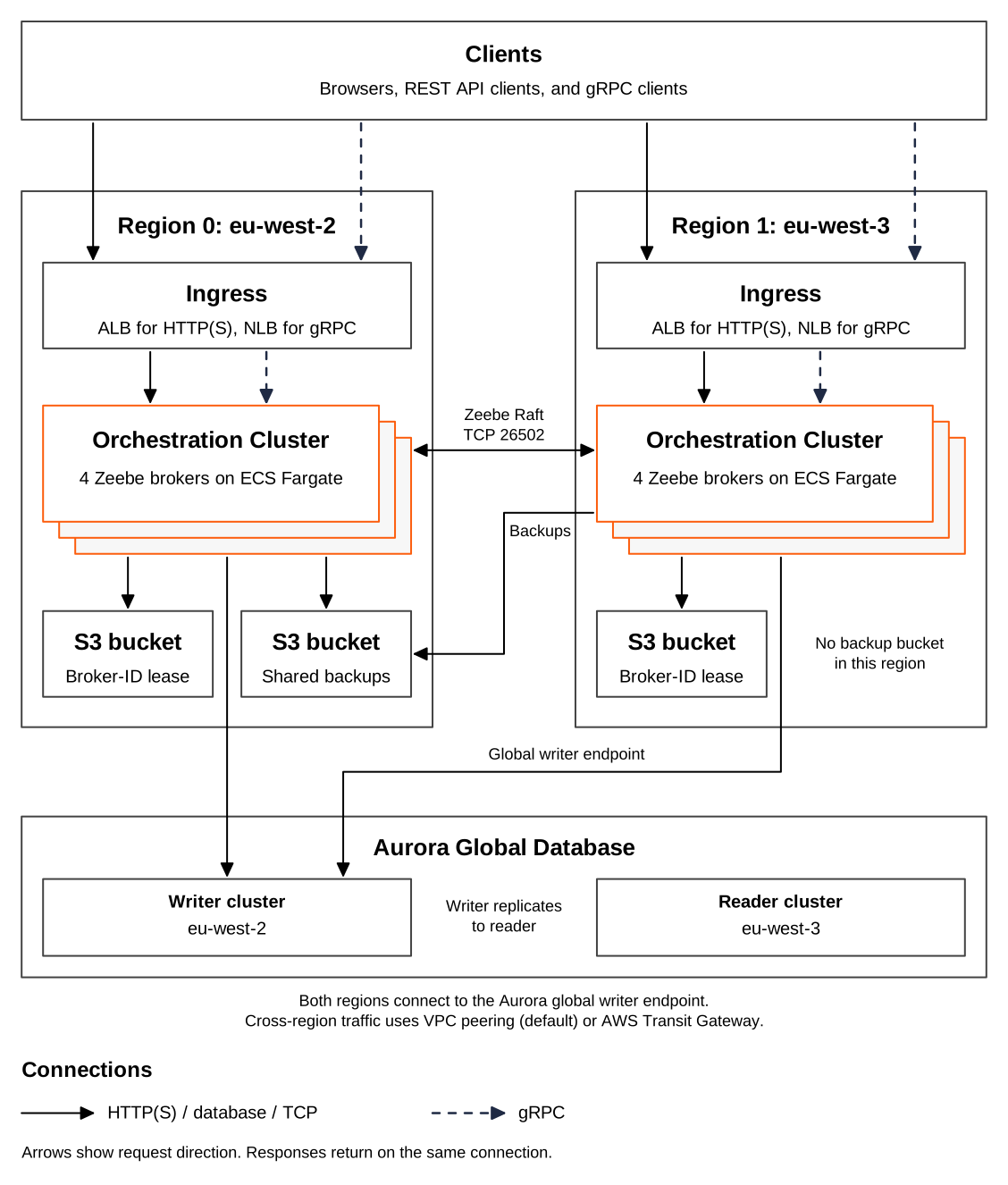
Both regions write backups to the single S3 backup bucket in region 0. Each region keeps its own S3 bucket for the broker-ID lease. Both regions connect to the Aurora global writer endpoint in region 0, and the writer replicates to the reader cluster in region 1.
This reference architecture is not a turnkey module. Clone the repository and adapt it to your environment — you are responsible for operating and maintaining the resulting infrastructure.
Prerequisites
AWS permissions
Your AWS IAM principal needs permissions for the following services in both target regions:
- ECS (clusters, task definitions, services)
- RDS (Aurora Global, DB clusters, parameter groups)
- EC2 (VPCs, subnets, security groups, Transit Gateway or VPC peering)
- ELB (ALB, NLB, target groups)
- IAM (roles, policies, instance profiles)
- KMS (key creation and grants)
- S3 (bucket creation and policy)
- EFS (file systems, mount targets)
- CloudWatch Logs (log groups)
- Secrets Manager (secret creation)
- Systems Manager Session Manager (
ssm:StartSession), required for the Session Manager access path and the failover and failback scripts - Route 53 Resolver — required only when
enable_cross_region_dns_resolver = true:route53resolver:CreateResolverEndpoint,route53resolver:CreateResolverRule,route53resolver:AssociateResolverRule
AWS service quotas
Dual-region deployments may require quota increases. Before deploying, verify the following quotas in both regions and request increases as needed:
- Aurora Global Database (some accounts require a support request to enable Aurora Global).
- Elastic IPs (NAT gateways consume one per AZ per region).
- Transit Gateway attachments (default account limit).
- Fargate vCPU quota per region.
- VPC count per region.
Tooling
| Tool | Purpose |
|---|---|
terraform | Infrastructure provisioning. The infra layer requires Terraform 1.9 or later. Pin to the version in .tool-versions. |
aws CLI v2 | AWS resource inspection and authentication. |
jq | JSON parsing in verification commands and the failover and failback scripts. |
session-manager-plugin | Required for the Session Manager access path and for the failover and failback scripts. Install with brew install --cask session-manager-plugin on macOS or follow the AWS instructions. |
just (optional) | Task runner for common operations in the reference repository. |
asdf (optional) | Tool version management. |
Configure valid AWS credentials before starting. The AWS Terraform provider supports several authentication methods:
-
For development or testing, configure the AWS CLI — Terraform automatically detects and uses those credentials:
aws configure -
For production, export credentials as environment variables:
AWS_ACCESS_KEY_IDandAWS_SECRET_ACCESS_KEY.
Obtain a copy of the reference architecture
Download a copy of the reference architecture from the GitHub repository. The reference architectures are versioned according to Camunda releases (for example, stable/8.x). The copy lets you reuse and extend the provided Terraform examples without the constraints of a third-party-maintained module:
loading...
With the reference architecture in place, you can proceed with the remaining steps. Make sure you're in the correct directory before continuing.
Terraform layout
The reference architecture splits infrastructure into three independent state layers. Deploy them in order; each layer reads the previous layer's outputs via terraform_remote_state.
terraform/
├── vpc/    ← VPCs + cross-region networking. Supports BYO-VPC.
├── infra/  ← Aurora Global, ECS clusters, ALB/NLBs, KMS, S3, secrets, IAM.
└── app/    ← Camunda task definitions + ECS services.
| Layer | Directory | Contents | Change frequency |
|---|---|---|---|
| VPC | terraform/vpc/ | VPCs, subnets, NAT gateways, Transit Gateway or VPC peering, optional Route 53 Resolver | Low |
| Infra | terraform/infra/ | Aurora Global Database, ECS clusters, ALB, NLB, KMS, S3, EFS, Secrets Manager, IAM | Low |
| App | terraform/app/ | Camunda orchestration cluster and Connectors task definitions, plus the matching ECS services | High |
Terraform state backend
All three layers keep their state in one S3 bucket that you create beforehand. The state key of each layer is <prefix><layer>/terraform.tfstate, and the infra and app layers read the previous layer's state from that key through terraform_remote_state. All three layers must therefore use the same bucket and key prefix. Step 1 sets them once for every layer.
Deploy time and cost
Wall-clock time for a greenfield deploy to a first healthy /v2/topology response with eight brokers:
| Phase | Wall clock | What's slow |
|---|---|---|
vpc/ apply | 3–5 min | VPC creation plus cross-region peering or Transit Gateway attachment. |
infra/ apply | 15–20 min | Aurora Global Database creation (primary first, then secondary attaches). |
app/ apply | ~30 s plan + 15–20 min | ECS service rollout waits for steady state; first cross-region Raft quorum takes the most. |
| Total | 35–45 min |
terraform destroy is faster: about 15–20 minutes end-to-end, with Aurora teardown again the bottleneck.
Actual costs depend on region, instance sizing, commit discounts, and cross-region data egress. Use the AWS Pricing Calculator to estimate for your configuration.
Architecture decisions
Make these decisions before running any terraform apply. They affect every layer of the deployment.
Networking mode
| Option | networking_mode value | When to use |
|---|---|---|
| VPC peering (default) | vpc_peering | Simpler to manage. Start here if you don't have a cross-region network in place. |
| Transit Gateway | transit_gateway | Enterprise scenarios — existing Transit Gateway deployments or hub-and-spoke topologies that need to integrate this cluster. Choose this only when you actually need it and understand the hourly and per-GB charges. |
Neither Transit Gateway nor VPC peering encrypts traffic at the network layer. Raft replication between Zeebe brokers crosses the AWS backbone in cleartext unless you add an encryption layer (for example, IPsec on the TGW attachment, or application-layer TLS on the Zeebe broker channel). Regulated workloads should evaluate this before choosing.
VPC source
| Option | byo_vpc value | When to use |
|---|---|---|
| Greenfield | false (default) | Terraform creates two VPCs, subnets across three availability zones, NAT gateways, internet gateways, and the cross-region link. |
| BYO-VPC | true | You supply existing VPCs and subnets. Terraform skips VPC creation but still provisions the cross-region link and optional DNS resolver. |
BYO-VPC is the preferred path for customers integrating with an existing AWS landing zone. Supply the following per region (replace N with 0 or 1):
| Variable | Constraint |
|---|---|
region_N_vpc_id | Existing VPC ID (vpc-xxxxxxxx). |
region_N_vpc_cidr | CIDR of the existing VPC. |
region_N_private_subnet_ids | At least three private subnet IDs in distinct AZs (used by ECS tasks and Aurora). |
region_N_public_subnet_ids | At least three public subnet IDs in distinct AZs with an internet gateway route (used by ALB). |
region_N_private_route_table_ids | At least one private route table ID per region (for cross-region routes). |
The full validation contract — including the plan-time checks that fail with a descriptive error when a constraint is missing — lives in terraform/vpc/README.md in the reference repository.
Secondary storage engine
The db_engine variable in terraform/infra/terraform.tfvars selects the Aurora engine for RDBMS secondary storage. It drives the Aurora clusters, the security group rules, the IAM database user seeding, and the generated JDBC URL. Choose the engine before the first terraform apply. Camunda doesn't support in-place migration between secondary storage backends, so switching engines later means creating a new deployment.
db_engine value | Aurora engine | Port |
|---|---|---|
postgresql (default) | aurora-postgresql | 5432 |
mysql | aurora-mysql | 3306 |
Changing db_engine on an existing deployment replaces the global cluster and both regional clusters without a final snapshot. All secondary storage data is permanently lost.
The published Camunda image doesn't include the MySQL JDBC driver. To use db_engine = "mysql", build a custom image that adds it. See user-supplied drivers.
Secondary storage replication lag
Aurora Global Database replicates asynchronously, so promoting a new writer can leave it missing whatever had not reached it yet. Camunda retains the source records needed to recover that gap; Aurora replication alone does not prevent it.
Exporting and acknowledging are separate steps. The RDBMS exporter writes a record to the Aurora writer, then tells the broker the record is safe only after the required replica quorum confirms the flush marker. This architecture sets min-sync-replicas to one, so the single Aurora reader must confirm the marker before the exporter acknowledges the position. Until then, the record continues to occupy the Zeebe log. Holding that position back is enough to keep segments on disk; releasing them is not this exporter's decision alone, since compaction tracks the slowest consumer on the partition.
If the required replica falls behind, acknowledgement is held back and the Zeebe log grows. The replica catches up from the writer, not from Zeebe. The retained records matter when the writer itself is lost: the promoted reader resumes from its own position, and Zeebe replays the gap.
The reference architecture pins four properties under camunda.data.secondary-storage.rdbms., shortened in the table below. Multi-region support documents what each one does, including which vendors support LOG_SEQ and how the DELAY alternative behaves. The table records only which values this architecture picks and why.
| Setting | Value | Why this value here |
|---|---|---|
async-replication.enabled | true | Off by default. This architecture delegates replication to Aurora and treats a writer failover as routine, so the monitoring is not optional. |
async-replication.type | LOG_SEQ | The preferred strategy, and Aurora Global Database with PostgreSQL supports it. The DELAY fallback would add a static wait to every acknowledgement instead. |
async-replication.max-lag | PT1H | Sized for a cross-region promotion under load, which runs past the PT15M default. |
async-replication.pause-on-max-lag-exceeded | false | The engine default, kept deliberately. |
max-lag is pinned even though pausing is off, so the budget is already sized if you turn pausing on later, which is then a one-line change. Under LOG_SEQ, this value is compared with the age of the oldest exporter position still waiting for confirmation, not with a lag figure reported by Aurora. Turn pausing on only once you have alerting on replication lag. It makes a stall loud, because the exporter logs a warning and every later export raises an ExporterException, but writes to Aurora stop, so secondary storage stays stale until replication recovers. It protects nothing that acknowledgement does not already protect, since a record is reported safe to the broker only after confirmed replication either way.
EFS is elastic rather than a fixed-size volume, but a long outage still increases stored data, throughput use, and cost. Monitor EFS storage growth and throughput, and alert on replication lag.
An unsupported vendor or a non-global Aurora instance fails while the exporter is starting, and the message names the reason, so the deployment never comes up quietly without the replication signal. Later failures differ by where they happen. A replication status read that fails is logged and retried at the next poll. A failure to capture the replication marker while flushing pauses exporting instead, until the periodic checks recover. On the Aurora path the database privileges are exercised by those reads rather than checked at startup.
Deployment walkthrough
Step 1 — Configure
Set the Terraform state backend once, from aws/containers/ecs-dual-region-fargate, in the shell you use for the following steps. The infra and app layers read the TF_VAR_terraform_backend_* variables, and terraform init reads backend.hcl in every layer:
export TF_VAR_terraform_backend_bucket="<your-tf-state-bucket>"
export TF_VAR_terraform_backend_region="<tf-state-bucket-region>" # defaults to eu-central-1
export TF_VAR_terraform_backend_key_prefix="<your-key-prefix>/"   # same prefix for all three layers

cat > backend.hcl <<EOF
bucket = "${TF_VAR_terraform_backend_bucket}"
region = "${TF_VAR_terraform_backend_region}"
EOF
Then create a terraform.tfvars file in each of the three Terraform directories.
terraform/vpc/terraform.tfvars
Required variables for a greenfield deployment:
cluster_name       = "<your-cluster-name>"
aws_profile        = "<your-aws-profile>" # optional; omit when authenticating via AWS_ACCESS_KEY_ID / AWS_SECRET_ACCESS_KEY
region_0           = "<primary-region>"         # for example, eu-west-2
region_1           = "<secondary-region>"       # for example, eu-west-3
networking_mode    = "vpc_peering"              # default; set to "transit_gateway" only for Enterprise scenarios
region_0_cidr      = "10.192.0.0/16"
region_1_cidr      = "10.202.0.0/16"
single_nat_gateway = false                      # set to true to reduce NAT costs in non-production
For BYO-VPC, add:
byo_vpc = true

region_0_vpc_id                  = "vpc-<your-vpc-id>"
region_0_vpc_cidr                = "<your-vpc-CIDR>"
region_0_private_subnet_ids      = ["subnet-aaa", "subnet-bbb", "subnet-ccc"]
region_0_public_subnet_ids       = ["subnet-ddd", "subnet-eee", "subnet-fff"]
region_0_private_route_table_ids = ["rtb-xxx"]

region_1_vpc_id                  = "vpc-<your-vpc-id>"
region_1_vpc_cidr                = "<your-vpc-CIDR>"
region_1_private_subnet_ids      = ["subnet-ggg", "subnet-hhh", "subnet-iii"]
region_1_public_subnet_ids       = ["subnet-jjj", "subnet-kkk", "subnet-lll"]
region_1_private_route_table_ids = ["rtb-yyy"]
terraform/infra/terraform.tfvars
If you pull the Camunda image from registry.camunda.cloud, the infra layer takes your registry_username and registry_password. Do not commit terraform.tfvars to source control. Add *.tfvars to your .gitignore, or supply secrets via TF_VAR_registry_username / TF_VAR_registry_password environment variables or a secrets backend such as HashiCorp Vault.
cluster_name                 = "<your-cluster-name>"   # must match vpc layer
aws_profile                  = "<your-aws-profile>"    # optional; omit when authenticating via env vars
region_0                     = "<primary-region>"
region_1                     = "<secondary-region>"
db_engine                    = "postgresql"            # default; see Secondary storage engine
s3_force_destroy             = true                    # default; flip to false before running real workloads (see Cleanup)
limit_access_to_cidrs        = ["<your-source-cidr>"]  # defaults to 0.0.0.0/0; restrict to the CIDR range that should reach the load balancers
registry_username            = "<your-registry-user>"  # optional; only needed for images from registry.camunda.cloud
registry_password            = "<your-registry-pass>"
terraform/app/terraform.tfvars
aws_profile                  = "<your-aws-profile>" # optional; omit when authenticating via env vars
region_0                     = "<primary-region>"   # must match the vpc and infra layers
region_1                     = "<secondary-region>"
camunda_image                = "registry.camunda.cloud/camunda/camunda:<camunda-version>" # 8.10 or later
connectors_image             = "camunda/connectors-bundle:<connectors-bundle-version>"     # pulled from Docker Hub without registry credentials
default_tags                 = { Environment = "reference", Team = "<your-team>" }
Step 2 — Deploy VPC
cd terraform/vpc
terraform init -backend-config=../../backend.hcl \
  -backend-config="key=${TF_VAR_terraform_backend_key_prefix}vpc/terraform.tfstate"
terraform plan
terraform apply
- Greenfield: creates two VPCs, six subnets (three private and three public per region), NAT gateways, internet gateways, and the cross-region link. Expect 3–5 minutes.
- BYO-VPC: creates only the cross-region link and optional DNS resolver. Expect under 1 minute.
Step 3 — Deploy infra
cd ../infra
terraform init -backend-config=../../backend.hcl \
  -backend-config="key=${TF_VAR_terraform_backend_key_prefix}infra/terraform.tfstate"
terraform plan
terraform apply
This layer creates the Aurora Global Database, ECS clusters, load balancers, KMS keys, S3 buckets, EFS file systems, Secrets Manager secrets, and IAM roles.
Aurora Global Database creation takes 15–20 minutes. If Terraform reports a timeout, first check the Aurora cluster status in the AWS console or with aws rds describe-global-clusters before re-running terraform apply. A real failure (quota exceeded, KMS grant failure, IAM permission gap) does not resolve by re-running and will repeat each cycle. Only re-run when the cluster status is creating or available.
After apply completes, a one-time db_seed ECS task runs automatically to create an IAM-authenticated camunda database user. The orchestration cluster connects to Aurora as this user using its ECS task role (no password). Monitor the seed task in CloudWatch Logs at /ecs/<cluster_name>-r0-db-seed. A successful run ends with the task exiting with status code 0; if the task fails, re-running terraform apply re-triggers it.
Step 4 — Deploy app
cd ../app
terraform init -backend-config=../../backend.hcl \
  -backend-config="key=${TF_VAR_terraform_backend_key_prefix}app/terraform.tfstate"
terraform plan
terraform apply
terraform apply itself completes in approximately 30 seconds. The actual wait is ECS reaching steady state and the eight Zeebe brokers forming a Raft quorum, which can take up to 20 minutes on a cold start in a dual-region setup. If the cluster has not stabilized after 30 minutes, treat it as a real failure rather than continued patience and investigate (see below).
The wait_for_steady_state provider timeout may expire before all brokers stabilize. Before concluding success, verify cluster health with two checks:
- In the ECS console for each region, confirm both the orchestration cluster and Connectors services show steady state with the expected running task count (four orchestration tasks per region, one Connectors task per region) and no recent task failures in the Events tab.
- Run the
/v2/topologycheck from Step 5 and confirm eight brokers are visible with healthy partitions.
If either check fails, do not proceed to verification. Inspect CloudWatch Logs for the orchestration-cluster log group and the ECS service event stream. The most common causes are image pull failures, IAM or Secrets Manager misconfiguration, and cross-region security group rules blocking ports 26500–26502.
Step 5 — Verify
Run the helper script from the reference repository to validate that the deployment is healthy in both regions. The script checks ECS service counts, the Zeebe topology, and Aurora Global Database status, and starts a test process instance. It sources procedure/export_environment_prerequisites.sh automatically to read the Terraform outputs:
cd ../../  # back to aws/containers/ecs-dual-region-fargate
./procedure/verify_dual_region.sh
When enable_cross_region_dns_resolver = true, also confirm that cross-region service-discovery DNS works:
source ./procedure/export_environment_prerequisites.sh
./procedure/test_cross_region_dns.sh
To check the cluster yourself, retrieve the admin password and ALB endpoint from the infra layer, then call /v2/topology — Camunda 8.10 requires Basic authentication on all /v2/* endpoints:
cd terraform/infra
ALB_R0=$(terraform output -raw region_0_alb_endpoint)
ADMIN_PASS=$(terraform output -raw admin_user_password)
curl -s -u "admin:${ADMIN_PASS}" "http://${ALB_R0}/v2/topology" | jq '.brokers | length'
# Expected: 8 once Raft has settled
Confirm the full topology response shows:
- Eight brokers in
brokers. - Eight partitions across the cluster.
replicationFactorequal to 4.- All partition roles are
leaderorfollower(all lowercase; nonullentries). - Zero unhealthy partitions.
Also verify Aurora Global health:
aws rds describe-global-clusters \
  --query "GlobalClusters[*].{Status:Status,Members:GlobalClusterMembers[*].IsWriter}" \
  --output table
The output must show Status=available with two members, one writer and one reader.
The verification commands use http:// because TLS is not configured by default. HTTP transmits Basic authentication credentials and process data in cleartext. Before exposing the cluster to any non-trusted network, attach a TLS certificate to the ALB (see Next steps) and rerun the verification over https://.
Step 6 — Cleanup
If you failed over and the Aurora writer is still in region 1, move it back first with ./procedure/failback.sh --failed-region 0 --switch-writer (see Fail back to both regions). Then destroy resources in reverse order to respect layer dependencies:
cd terraform/app && terraform destroy
cd ../infra && terraform destroy
cd ../vpc && terraform destroy
The reference architecture sets s3_force_destroy = true by default so terraform destroy removes backup S3 buckets without manual emptying. Flip s3_force_destroy to false in terraform/infra/terraform.tfvars and re-apply the infra layer before running any real workload through the stack. Otherwise, terraform destroy will delete backup data permanently.
If terraform destroy fails, check the teardown inputs s3_force_destroy and db_force_destroy in the infra layer README.
Verify connectivity to Camunda 8
Using Terraform, you can obtain the HTTP endpoint of each Application Load Balancer and interact with Camunda through the Orchestration Cluster REST API.
To keep dependencies minimal and non-blocking for a quick start, this reference architecture omits a custom domain and TLS configuration.
You can add TLS by attaching an AWS Certificate Manager (ACM) certificate to each Application Load Balancer. For details, see the AWS documentation on creating an HTTPS listener. Information on configuring a custom domain is available in the Application Load Balancer documentation.
Without these additions, traffic is transmitted in cleartext and is therefore insecure.
-
Navigate to the infra Terraform folder:
cd terraform/infra -
Retrieve an ALB endpoint. The dual-region setup is active-active, so either region's ALB works:
terraform output -raw region_0_alb_endpoint
terraform output -raw region_1_alb_endpoint
Both ALBs expose the Orchestration Cluster and Connectors through the same port and use listener rules to determine the path they're on:
- ALB:80
/*routes to the Orchestration Cluster UI and REST API./connectors*routes to the Connectors.
- ALB:9600
- Not forwarded to the management API (see Endpoint reference).
- Connectors combines the management port with the web server by default.
- NLB:26500 (TCP)
- Exposes the Orchestration Cluster Zeebe Gateway over gRPC. Retrieve the endpoint with
terraform output -raw region_0_nlb_grpc_endpointorterraform output -raw region_1_nlb_grpc_endpoint.
- Exposes the Orchestration Cluster Zeebe Gateway over gRPC. Retrieve the endpoint with
- ALB:80
-
Access the URL of
region_0_alb_endpoint(orregion_1_alb_endpoint), which presents a login screen.The admin user is
admin. The password is randomly generated and shared between regions. Retrieve it with:terraform output -raw admin_user_password -
Use the Orchestration Cluster REST API to communicate with Camunda. Follow the authentication example to authenticate and retrieve the cluster topology.
Seeded users
Camunda 8.10 requires Basic authentication on the unified /v2/* REST API. Two users are seeded at first boot:
admin— full access; use this user to log into Operate, Tasklist, and other Web UIs.connectors— used by the Connectors bundle to call the orchestration cluster.
Both passwords are auto-generated (32 random characters) and stored in AWS Secrets Manager. They are not demo:demo, matching the single-region ECS Terraform reference.
Retrieve credentials
The admin password is generated once during the infra layer apply and shared by both regions:
cd terraform/infra
ADMIN_PASS=$(terraform output -raw admin_user_password)
echo "admin / $ADMIN_PASS"
The Connectors password is also stored in Secrets Manager. Retrieve it with the AWS CLI:
SECRET_ARN=$(terraform output -raw connectors_password_secret_region_0_arn)
CONNECTORS_PASS=$(aws secretsmanager get-secret-value \
  --secret-id "$SECRET_ARN" \
  --query SecretString --output text)
You can also locate the secrets in the AWS console at Secrets Manager > <cluster_name>-r0-oc-admin-user-password-*.
Method A — direct via ALB
Use the ALB when your source IP is in limit_access_to_cidrs. This is the easiest path for an internet-facing demo.
ALB_R0=$(terraform output -raw region_0_alb_endpoint)

# Topology (auth required on 8.10+)
curl -s -u "admin:${ADMIN_PASS}" "http://${ALB_R0}/v2/topology" | jq '.brokers | length'
# Expected: 8 (four brokers per region once Raft has settled)

# Open Operate in a browser
open "http://${ALB_R0}/operate"
If limit_access_to_cidrs is restricted to a corporate CIDR your laptop is not in, use Method B.
Method B — Session Manager port-forward
Use this method when the ALB is not reachable from your machine — for example, a private deployment, a locked-down CIDR allow-list, or a customer audit requirement that forbids opening a public endpoint. The session piggybacks on the ECS Exec channel; no bastion host is needed.
Requirements:
task_enable_execute_command = trueon the orchestration cluster module. The reference architecture sets this totrueby default — seeterraform/app/camunda.tf.- The task IAM role must allow
ssmmessages:CreateControlChannel,ssmmessages:CreateDataChannel,ssmmessages:OpenControlChannel, andssmmessages:OpenDataChannel. Theecs_exec_policyin the orchestration-cluster module already grants these. - AWS Session Manager plugin installed locally (
brew install --cask session-manager-pluginon macOS).
Start the port-forwarding session:
# 1. Pick a running orchestration-cluster task in region 0
CLUSTER=$(cd terraform/infra && terraform output -raw cluster_name)
TASK_ARN=$(aws ecs list-tasks \
  --cluster "${CLUSTER}-r0-cluster" \
  --service-name "${CLUSTER}-r0-oc-orchestration-cluster" \
  --query 'taskArns[0]' --output text)
TASK_ID=${TASK_ARN##*/}

# 2. Resolve the ECS-managed runtime ID (Session Manager target)
RUNTIME_ID=$(aws ecs describe-tasks \
  --cluster "${CLUSTER}-r0-cluster" \
  --tasks "$TASK_ID" \
  --query 'tasks[0].containers[?name==`orchestration-cluster`].runtimeId' \
  --output text)

# 3. Start a port-forwarding session: localhost:8080 → container 8080
aws ssm start-session \
  --target "ecs:${CLUSTER}-r0-cluster_${TASK_ID}_${RUNTIME_ID}" \
  --document-name AWS-StartPortForwardingSession \
  --parameters '{"portNumber":["8080"],"localPortNumber":["8080"]}'
In another shell, open the UI and log in as admin with $ADMIN_PASS:
open http://localhost:8080
To reach the management API on port 9600, start the same session with {"portNumber":["9600"],"localPortNumber":["9600"]}, then call http://localhost:9600/actuator/.... The failover and failback scripts open this tunnel for you.
Endpoint reference
| Endpoint | Port | Protocol | Purpose |
|---|---|---|---|
| ALB (region 0/1) | 80 | HTTP | Camunda REST API and Web UI (routes to container 8080). |
| ALB (region 0/1) | 9600 | HTTP | Listener with a fixed empty response. No rule forwards it to the management API, because enable_alb_http_management_listener_rule = false in terraform/app/camunda.tf. Reach the management API through Method B. |
| NLB external (region 0/1) | 26500 | TCP | Zeebe gRPC for clients. |
| NLB internal (region 0/1) | 26502 | TCP | Zeebe Raft, cross-region, private. |
Operations
Backup and restore
The general backup and restore procedure applies, with two dual-region specifics to keep in mind:
- Backups share one bucket. The infra layer creates a single S3 backup bucket in region 0, exposed as the
backup_bucket_region_0_nameoutput. Both orchestration clusters write to it throughCAMUNDA_DATA_BACKUP_S3_BUCKETNAME, and region 1 brokers setCAMUNDA_DATA_BACKUP_S3_REGIONto region 0 so they reach the bucket cross-region. All backup data stays in one place, whichever region you trigger the backup from. If you lose region 0, you lose access to the backup bucket until the region recovers, so plan S3 replication yourself if you need the backups in both regions. - Restore is not exposed by the dual-region app layer. The underlying orchestration-cluster module supports an init-container restore (
restore_enabled,restore_backup_id— see restore options when using RDBMS), but these variables are not surfaced interraform/app/camunda.tfin this reference. Enabling restore for a dual-region deployment requires customizing the app layer to pass the restore variables to both regional module invocations and to coordinate broker IDs that span both regions. Treat dual-region restore as an advanced scenario; validate it against your specific topology before relying on it.
Camunda recommends restoring to a fresh cluster rather than reusing an existing one. A newly created cluster has empty S3 backup buckets and EFS volumes, so no additional cleanup is needed. If you restore into an existing cluster, manually empty the S3 bucket configured for the node ID provider and fully clear the EFS volumes in both regions before starting the restore.
Failover and failback
To recover from a region loss, follow the ECS dual-region operational procedure. It fails over and back with the failover.sh and failback.sh scripts from the reference repository.
Troubleshooting
Logs
ECS task logs are exported to CloudWatch by default unless you configure otherwise. They are visible in the CloudWatch console and inline in the ECS service view alongside each task.
Retrieve the log group names from the app layer output:
cd terraform/app
terraform output -raw region_0_log_group_name
terraform output -raw region_1_log_group_name
Accessing task or management API
ECS tasks are not reachable from outside the VPC without a workaround. Options include:
- Use the Session Manager port-forward method to reach a running orchestration cluster task without a public IP. The reference architecture sets
task_enable_execute_command = trueby default, so the channel is already available. - Run an EC2 or ECS debug task inside the same VPC and call the management API over the private network.
- Connect via an AWS Client VPN attached to the VPC.
- Use Lambda or Step Functions to invoke the API.
- Temporarily forward the ALB's port 9600 to the management API (not recommended for production). See Endpoint reference.
To open an interactive shell on a running task via AWS ECS Exec:
CLUSTER=$(cd terraform/infra && terraform output -raw cluster_name)
TASK_ARN=$(aws ecs list-tasks \
  --cluster "${CLUSTER}-r0-cluster" \
  --service-name "${CLUSTER}-r0-oc-orchestration-cluster" \
  --query 'taskArns[0]' --output text)

aws ecs execute-command \
  --cluster "${CLUSTER}-r0-cluster" \
  --task "${TASK_ARN##*/}" \
  --container orchestration-cluster \
  --command "/bin/sh" \
  --interactive
For general troubleshooting, see the operational guides troubleshooting documentation.
Known limitations
- Experimental. This reference architecture is intended for learning and validation. Validate it against your own requirements before you run production workloads on it.
- Manual failover only. No automated health-check-driven failover is included. Run the failover and failback scripts yourself.
- Components. Only the Orchestration Cluster and Connectors are deployed. Management Identity (Keycloak), Web Modeler, and Console aren't included, and Optimize isn't available with RDBMS secondary storage.
- ECS deployment circuit breaker disabled. The circuit breaker is off for both orchestration cluster services. On a first deploy, brokers fail ECS health checks for a while as Aurora IAM authentication warms up and the cross-region Raft quorum forms, which takes about 20 minutes. The circuit breaker would roll the deployment back before the cluster recovers. With the breaker off, ECS keeps retrying until the 30-minute
service_timeouts.createdeadline. Once the cluster is stable, you can re-enable it for later deployments.
Next steps
After you have a working dual-region deployment, consider the following:
- Connect to an identity provider to integrate with an external identity system.
- Add TLS by attaching an AWS Certificate Manager (ACM) certificate to the Application Load Balancers.
- Review the dual-region concept documentation for current limitations and operational considerations.
- Browse the single-region ECS Fargate guide for a comparison with the simpler single-region pattern.