Resolve incidents and update variables
Learn how to resolve incidents and update variables in Camunda 8 Operate.
Overview
Every process instance created for the order-process.bpmn process model requires an orderValue so the XOR gateway evaluation will happen properly.
Let’s look at a case where orderValue is present and was set as a string, but our order-process.bpmn model required an integer to properly evaluate the orderValue and route the instance.
Before you begin
To follow this guide, install zbctl, a community-supported command line interface for interacting with Camunda 8.
Create a process instance
Create a process instance with an orderValue of "99":
- Linux
- macOS
- Windows
./bin/zbctl --insecure create instance order-process --variables '{"orderId": "1234", "orderValue":"99"}'
./bin/zbctl.darwin --insecure create instance order-process --variables '{"orderId": "1234", "orderValue":"99"}'
./bin/zbctl.exe --insecure create instance order-process --variables '{\"orderId\": \"1234\", \
"orderValue\": \"99\"}'
Advance an instance to an XOR gateway
To advance the instance to our XOR gateway, we’ll create a job worker to complete the Initiate Payment task:
- Linux
- macOS
- Windows
./bin/zbctl --insecure create worker initiate-payment --handler cat
./bin/zbctl.darwin --insecure create worker initiate-payment --handler cat
./bin/zbctl.exe --insecure create worker initiate-payment --handler "findstr .*"
We’ll publish a message that will be correlated with the instance, so we can advance past the Payment Received intermediate message catch event:
- Linux
- macOS
- Windows
./bin/zbctl --insecure publish message "payment-received" --correlationKey="1234"
./bin/zbctl.darwin --insecure publish message "payment-received" --correlationKey="1234"
./bin/zbctl.exe --insecure publish message "payment-received" --correlationKey="1234"
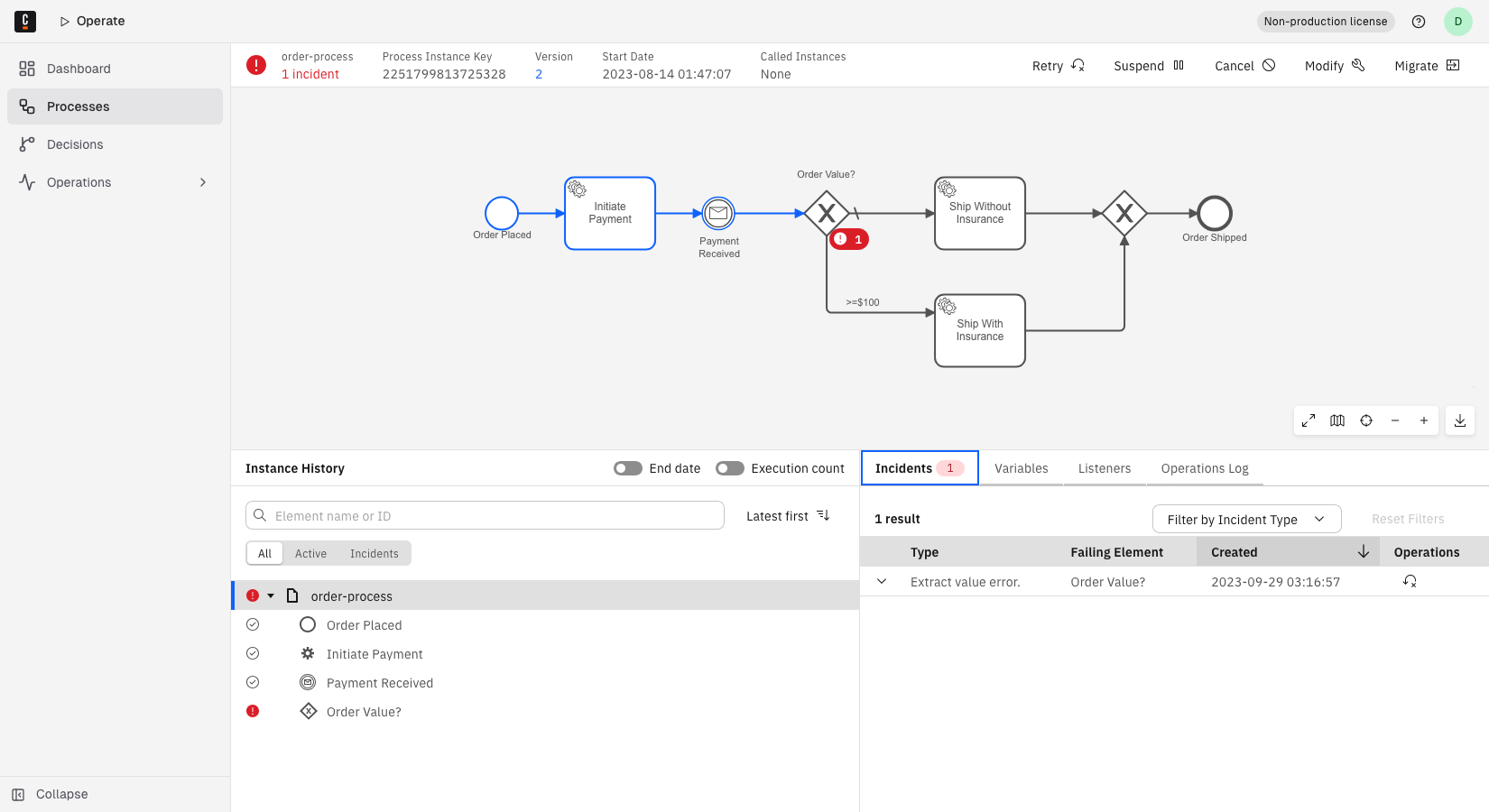
In the Operate interface, you should now observe the process instance has an incident, which means there’s a problem with process execution that must be fixed before the process instance can progress to the next step.
Diagnosing and resolving incidents
Operate provides tools for diagnosing and resolving incidents. Let’s go through incident diagnosis and resolution step by step.
When we inspect the process instance, we can observe exactly what our incident is:
- Click the Process Instance Key for the process stuck on the Order Value? node.
- Navigate to the Incidents tab in the bottom panel.
- Observe the error message:
Expected result of the condition expression 'orderValue >= 100' of sequence flow 'Flow_1n8m1op' to be 'BOOLEAN', but was 'NULL'. The evaluation reported the following warnings:
[NOT_COMPARABLE] Can't compare '"99"' with '100'
To resolve this incident, we must edit the orderValue variable so it’s an integer. To do so, take the following steps:
- Under Variables, click the edit icon next to the
orderValuevariable. - Edit the variable by removing the quotation marks.
- Click the checkmark icon to save the change.
We were able to solve this particular problem by editing a variable, but it’s worth noting you can also add a variable if a variable is missing from a process instance altogether.
Lastly, initiate a "retry" of the process instance by selecting Retry in the top right corner of the page.
You should now see the incident has been resolved, and the process instance has progressed to the next step.
Selecting Retry marks the incident as resolved and triggers a retry. It does not verify that the underlying cause has been fixed.
For a job incident, Camunda checks the problem again only when a worker next activates the job. If no worker is connected for the job type, the incident does not reappear even if the cause is still present. As a result, the process instance can appear healthy in Operate even though the problem remains unresolved.
Keep a worker connected for the affected job type so Camunda can raise a new incident promptly if the cause remains unresolved.
Complete a process instance
If you’d like to complete the process instance, create a worker for the Ship Without Insurance task:
- Linux
- macOS
- Windows
./bin/zbctl --insecure create worker ship-without-insurance --handler cat
./bin/zbctl.darwin --insecure create worker ship-without-insurance --handler cat
./bin/zbctl.exe --insecure create worker ship-without-insurance --handler "findstr .*"