Test files
Test files let you define shareable, low-code test cases for your BPMN processes.
They are stored in JSON format and follow the Camunda Process Test (CPT) JSON schema, so you can use the same files in Test mode and in an automated CPT test suite. You can create, edit, and manage them directly in Camunda Hub. You can also download these files or synchronize them with your Git repository using Git Sync.
Create a test file
You can create a new test file by saving a test case in Test mode.
You can also manage test cases and update failing test cases in Test mode.
Manual editing
Test case structure
Test files follow the CPT JSON test cases schema. Test mode adds two optional fields to that schema, processId and metadata, to link the file to a BPMN process and track test coverage.
{
  "$schema": "https://camunda.com/json-schema/cpt-test-cases/8.9/schema.json",
  "processId": "order-fulfillment-process",
  "testCases": [
    {
      "name": "Happy path order processing",
      "description": "Customer places an order that is processed successfully.",
      "instructions": [
        // Array of instruction objects
      ],
      "metadata": {
        // Optional - for use in Test mode only
        "processInstanceId": 12345,
        "coveredFlowNodes": [
          { "flowNodeId": "startEvent", "elementType": "START_EVENT" },
          { "flowNodeId": "processOrder", "elementType": "SERVICE_TASK" }
        ],
        "coveredSequenceFlows": ["flow1", "flow2"]
      }
    },
    {
      "name": "Error handling tests",
      "instructions": [
        // Array of instruction objects for error case
      ]
    }
  ]
}
Top-level fields
| Field | Required | Description |
|---|---|---|
processId | Yes | Test-mode-specific field. The ID of the BPMN process definition the test cases run against. Required by Test mode. |
testCases | Yes | An array of test case objects. |
Test case fields
| Field | Required | Description |
|---|---|---|
name | Yes | A descriptive name for the test case. |
description | No | A human-readable description of the test case. |
instructions | Yes | An array of instruction objects that define the test steps. |
metadata | No | Used by Test mode to show coverage and process instance details. Camunda does not recommend editing this field. |
Link a process (processId)
To display the file's test cases in Test mode, you must first link the file to a process.
Add a processId field with the process ID of the BPMN process you want to test:
{
  "processId": "Process_1"
}
You can find the BPMN process ID in the properties panel, or in the first <bpmn:process id= field of the XML.
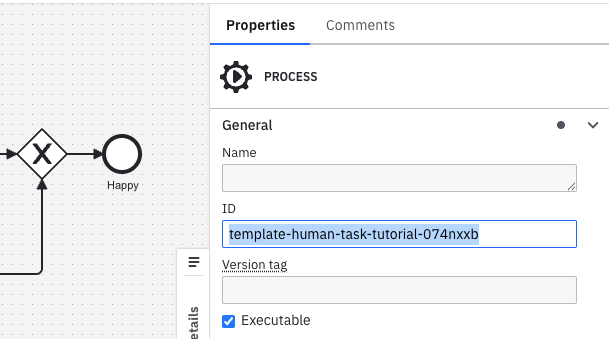
The processId should stay within the supported identifier-length limits of the target environment and must not contain whitespace.
processId is a Test mode specific extension to the CPT schema. It is preserved when running the file with CPT, but only Test mode uses it to link the file to a process.
Test mode runs only the first executable process within the BPMN diagram. Make sure the process ID you link is the first executable process.
If the BPMN diagram's process ID changes, or if another process ID is added earlier in the BPMN file, the file's test cases won't appear in the process's Test cases tab.
Unlink a process
To unlink the file from a process, remove the processId field or set it to null.
Unlinking a file means its test cases will not be shown in the Test cases tab for that process.
To fix this, re-link the file by restoring the processId field.
Instructions
Each instruction has a type property that identifies the action or assertion, plus additional properties depending on the type. Resources such as process instances, elements, user tasks, jobs, and messages are referenced through selectors.
The sections below show the instructions most commonly used in Test cases. For the complete list of instructions, selectors, and the full schema reference, see JSON test cases.
Create process instance
Creates a new process instance from a process definition.
{
  "type": "CREATE_PROCESS_INSTANCE",
  "processDefinitionSelector": {
    "processDefinitionId": "order-process"
  },
  "variables": {
    "orderId": "ORD-001",
    "priority": "high"
  }
}
To start a process via a message start event, use PUBLISH_MESSAGE. To start a process via a signal start event, use BROADCAST_SIGNAL.
Complete job
Completes a service task job during process execution.
{
  "type": "COMPLETE_JOB",
  "jobSelector": {
    "elementId": "processPayment"
  },
  "variables": {
    "paymentResult": "success",
    "transactionId": "TXN-123"
  }
}
Broadcast signal
Broadcasts a signal that can be caught by signal start events, signal intermediate catch events, or signal boundary events.
{
  "type": "BROADCAST_SIGNAL",
  "signalName": "ApprovalReceived",
  "variables": {
    "approved": true,
    "approver": "manager@company.com"
  }
}
Complete user task
Completes a user task with optional form data or variables.
{
  "type": "COMPLETE_USER_TASK",
  "userTaskSelector": {
    "elementId": "reviewOrder"
  },
  "variables": {
    "reviewComment": "Order looks good",
    "approved": true
  }
}
Publish message
Publishes a message that can be caught by message start events, message intermediate catch events, or message boundary events.
{
  "type": "PUBLISH_MESSAGE",
  "name": "PaymentConfirmed",
  "correlationKey": "order-12345",
  "variables": {
    "paymentAmount": 99.99,
    "paymentMethod": "credit_card"
  },
  "timeToLive": 300000,
  "messageId": "payment-msg-001"
}
Throw BPMN error from job
Simulates a job failure by throwing a BPMN error during service task execution.
{
  "type": "THROW_BPMN_ERROR_FROM_JOB",
  "jobSelector": {
    "elementId": "processPayment"
  },
  "errorCode": "PAYMENT_FAILED",
  "errorMessage": "Insufficient funds in customer account"
}
Update variables
Updates process variables during test execution.
{
  "type": "UPDATE_VARIABLES",
  "processInstanceSelector": {
    "processDefinitionId": "order-process"
  },
  "variables": {
    "customerId": "12345",
    "amount": 100.5
  }
}
Resolve incident
Resolves an incident that was created due to a job failure or another process issue.
{
  "type": "RESOLVE_INCIDENT",
  "incidentSelector": {
    "elementId": "processPayment"
  }
}
Assert variables
Checks that one or more process or local variables have expected values. Supports Test mode's variable assertions.
{
  "type": "ASSERT_VARIABLES",
  "processInstanceSelector": {
    "processDefinitionId": "order-process"
  },
  "variables": {
    "orderStatus": "confirmed"
  }
}
Assert an element instance (path)
Checks that a specific element reached an expected state. Supports Test mode's element (path) assertions.
{
  "type": "ASSERT_ELEMENT_INSTANCE",
  "processInstanceSelector": {
    "processDefinitionId": "order-process"
  },
  "elementSelector": {
    "elementId": "shipOrder"
  },
  "state": "IS_COMPLETED"
}
Assert a process instance
Checks the overall state of the process instance. Supports Test mode's process instance assertions.
{
  "type": "ASSERT_PROCESS_INSTANCE",
  "processInstanceSelector": {
    "processDefinitionId": "order-process"
  },
  "state": "IS_COMPLETED"
}
Usage tips
- Always use meaningful selector values, such as
elementIdorprocessDefinitionId, that match your BPMN diagram. - Give test cases descriptive names to clearly indicate the test case being tested.
- Include error test cases along with happy path tests.
- Use optional
variablesfields to test different data conditions. - Ensure correlation keys uniquely identify process instances when publishing messages.
- Specify
timeToLivevalues in milliseconds (for example,60000for one minute,300000for five minutes).