A2A Client usage patterns
The A2A Client connectors often work in combination to interact with remote A2A agents. This page outlines common usage patterns for the A2A Client connectors.
Synchronous request-response
The most straightforward usage pattern is when the A2A Client connector sends a request to a remote A2A agent and waits for the response. This is suitable for scenarios where you need immediate results.
The diagram below illustrates this pattern, with an A2A Client connector being used as a tool by an AI Agent connector:
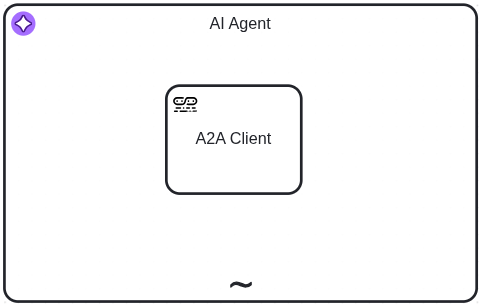
Configure the A2A Client connector
- A2A server URL: For example
https://a2a-agent.example.com. - Agent Card location: If different from the default
.well-known/agent-card.json. - Response retrieval:
Blocking. - Result expression:
={toolCallResult: result}.
Per the A2A specification, the remote A2A server might reject the request if the task is long-running.
Asynchronous polling
For long-running tasks, the A2A Client connector can send a request to a remote A2A agent and then poll for the result at regular intervals. This pattern is suitable when your task may take an extended period to complete.
The diagram below shows this pattern, with an A2A Client connector and an A2A Client Polling connector used as a tool by an AI Agent connector:
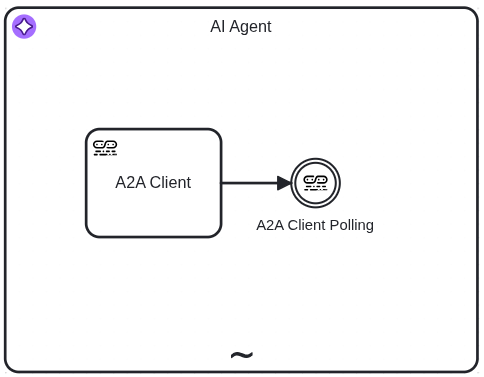
Configure the connectors
A2A Client connector
- A2A server URL: For example
https://a2a-agent.example.com. - Agent Card location: If different from the default
.well-known/agent-card.json. - Response retrieval:
Polling. An A2A Client Polling connector is used to fetch the result. - Result variable: A variable name to store the result used by the A2A Client Polling connector, e.g.
a2aAgentResponse.
A2A Client Polling connector
- A2A server URL: Same as used in the A2A Client connector.
- Agent Card location: Same as used in the A2A Client connector.
- A2A Client response: The variable name used in the A2A Client connector, e.g.
=a2aAgentResponse. - Task polling interval: For example
PT5S. - Result expression:
={toolCallResult: result}.
Polling behavior
The A2A Client Polling connector correlates the message immediately when polling is not required. This occurs in the following cases:
- The operation is Fetch Agent Card.
- The remote agent responds with a message.
- The remote agent responds with a task that is not in a
submittedorworkingstate.
To enable the A2A Client Polling connector only when needed, place a gateway before the connector. The diagram below illustrates this pattern, with a gateway controlling whether the A2A Client Polling connector runs:
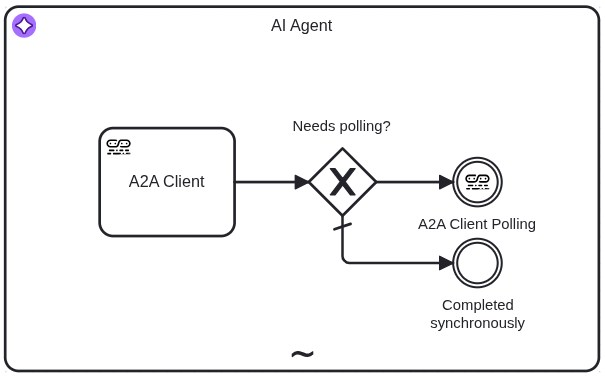
Use the following expression as the exclusive gateway condition to check whether polling is needed:
a2aAgentResponse.result.kind = "task" and list contains(["submitted", "working"], a2aAgentResponse.result.status.state)
Configure the following output on the Completed synchronously throw event:
- Process variable name:
toolCallResult. - Variable assignment value:
=a2aAgentResponse.result.
You can use a Receive task instead of an intermediate catch event. This allows you to attach boundary events for timeouts or error handling. Assign the A2A Client Polling receive task connector template to the receive task and configure it as described above.
Asynchronous push notifications
When the remote A2A agent supports push notifications, you can configure the A2A Client connector to send a request to the remote agent and then wait for task-update notifications. This pattern is suitable when the task may take an extended period to complete and push notifications are preferred over polling.
The diagram below illustrates this pattern, showing an A2A Client connector combined with an A2A Client Webhook connector used as a tool by an AI Agent connector:
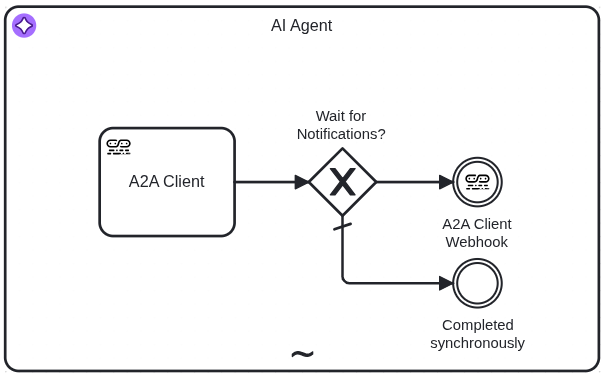
Configure the connectors
A2A Client connector
- A2A server URL: For example
https://a2a-agent.example.com. - Agent Card location: If different from the default
.well-known/agent-card.json. - Response retrieval:
Notification. An A2A Client Webhook connector is used to wait for the notifications. - Webhook URL: For example
http://some-camunda-cluster.com/inbound/22083f06-72fa-4f09-b4c5-8e83a0d66cb1. - Result variable: A variable name to store the result used by the A2A Client Polling connector, e.g.
a2aAgentResponse.
A2A Client Webhook connector
- Webhook ID: For example
22083f06-72fa-4f09-b4c5-8e83a0d66cb1. - A2A agent response: The variable name used in the A2A Client connector, e.g.
=a2aAgentResponse. - Result expression:
={toolCallResult: request.body}.
Use the following expression as the exclusive gateway condition to check whether push notifications are needed:
a2aAgentResponse.result.kind = "task" and list contains(["submitted", "working"], a2aAgentResponse.result.status.state)
Configure the following output on the Completed synchronously throw event:
- Process variable name:
toolCallResult. - Variable assignment value:
=a2aAgentResponse.result.
You can use a Receive task instead of an intermediate catch event. This allows you to attach boundary events for timeouts or error handling. Assign the A2A Client Webhook receive task connector template to the receive task and configure it as described above.