A2A Client connector
The A2A Client connector is used to interact with A2A agents, by retrieving remote agent’s Agent Card and sending messages to that agent.
Create an A2A Client connector task
You can apply a connector to a task or event via the append menu. For example:
- From the canvas: Select an element and click the Change element icon to change an existing element, or use the append feature to add a new element to the diagram.
- From the properties panel: Navigate to the Template section and click Select.
- From the side palette: Click the Create element icon.
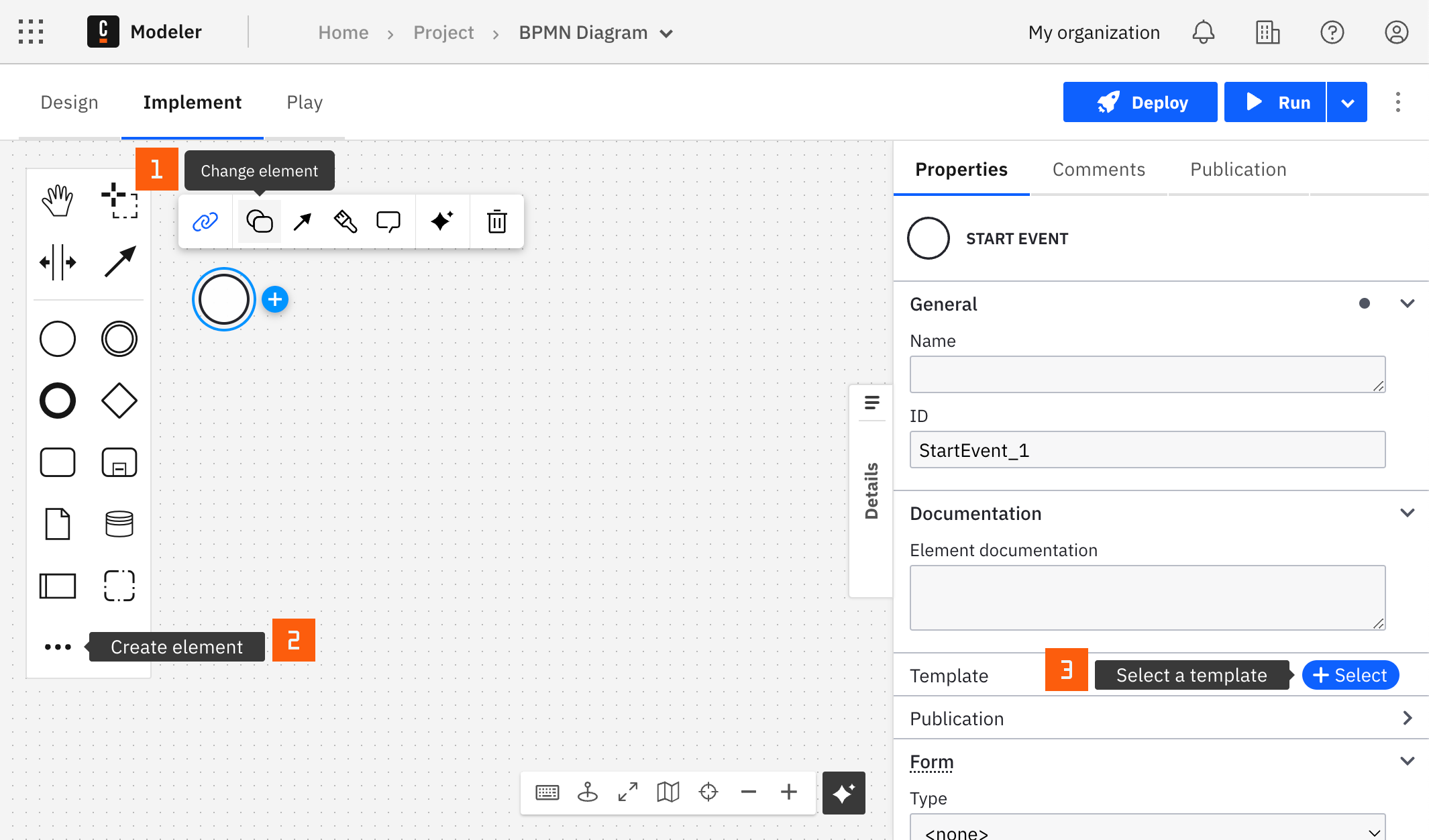
After you have applied a connector to your element, follow the configuration steps or see using connectors to learn more.
Make the A2A Client connector executable
To make the A2A Client connector executable, fill out the mandatory fields highlighted in red in the properties panel on the right.
The A2A Client connector supports two operational modes to accommodate different use cases: standalone and AI Agent tool.
Standalone mode
In standalone mode, you use the connector directly in a BPMN process as a service task. You explicitly configure the operation to perform and all associated parameters.
Configure the following:
-
HTTP connection:
- A2A server URL (required): Base URL of the A2A server. For example,
http://localhost:10000. - Agent Card location (optional): Path to the Agent Card endpoint relative to the base URL. By default,
.well-known/agent-card.json.
- A2A server URL (required): Base URL of the A2A server. For example,
-
Connector mode: Select Standalone.
-
Operation: Choose between two operations:
Fetch Agent Card
Use this operation to retrieve the Agent Card from the remote A2A server. The Agent Card describes the agent's capabilities and skills.
Response
This operation returns a JSON object containing the most relevant Agent Card details. Here's an example:
{
  "result": {
    "name": "Weather agent",
    "description": "Helps with weather information",
    "skills": [
      {
        "id": "weather-forecast",
        "name": "Weather Forecast",
        "description": "Get weather forecast information",
        "tags": ["forecast", "weather"],
        "examples": [
          "What's the weather like today in Berlin?",
          "Will it rain tomorrow in London?"
        ],
        "inputModes": ["text"],
        "outputModes": ["text"]
      }
    ],
    "kind": "agentCard"
  },
  "pollingData": {
    "id": "20be510a-9e12-40c2-ad4d-899ded442db3"
  }
}
See the Response structure section below for more details.
Send message
Use this operation to send a message to the remote agent and handle the response based on the configured retrieval method.
Configuration
-
Text (required): Message to send to the remote agent.
-
Context ID (optional): Identifier for grouping related interactions. Typically generated by the remote server; omit for first message or a new context.
-
Task ID (optional): ID of the task this message belongs to. Generated by the remote server; omit if not part of a specific task.
-
Reference task IDs (optional): List of task IDs this message references for context. FEEL expression; for example:
= ["e240a538-a857-4e88-b3d0-4ddaf4882cc6", "eb086e57-43e3-45c1-a944-9a23a8b823df"]. -
Documents (optional): List of Camunda document references to include with the message. This supports the same document types as the AI Agent connector.
-
Response retrieval (required): How to receive the final response from the remote agent
Blocking: Waits synchronously for the agent's response.Polling: Returns immediately with a task withsubmittedorworkingstate; use the A2A Client Polling Connector to retrieve results.Notification: Configures a webhook for the remote agent to push task-status updates; use the A2A Client Webhook Connector to receive notifications.- Webhook URL (required): URL where the agent will send the response. See A2A Client Webhook Connector for how to set up a webhook endpoint.
- Token (optional): Unique token for validating notifications. Use a static value or a FEEL expression, such as
= uuid(). - Authentication schemes (optional): List of auth schemes required by the webhook.
- Authentication credentials (optional): Credentials to authenticate webhook requests.
noteYou can use the
Notificationresponse retrieval method only if the remote agent supports it. Check the agent's capabilities in its Agent Card. -
History length (optional): Number of most recent messages from task history to include in the response. By default, it is three.
-
Response timeout (optional): Maximum time to wait for (the first) response, as ISO-8601 duration. By default,
PT1Mis one minute.
Response
This operation returns a JSON object containing the remote agent's response.
Here's an example when the remote agent replies with a message:
{
  "result": {
    "kind": "message",
    "role": "agent",
    "messageId": "202dc848-05d7-4aff-a147-45ba42c765b1",
    "contextId": "5b70baac-065e-4680-ace9-81289e67f51d",
    "contents": [
      {
        "type": "text",
        "text": "Based on the weather forecast, it looks like it will be sunny in Berlin today with a high of 25°C and a low of 15°C."
      }
    ]
  }
}
Here's an example when the remote agent replies with a task in the submitted state:
{
  "result": {
    "kind": "task",
    "id": "1f184812-0926-4f2c-881c-65c158a6dd11",
    "contextId": "8802db7b-8401-46b0-89f8-1ec3d5e81194",
    "status": {
      "state": "submitted",
      "message": {
        "kind": "message",
        "role": "agent",
        "messageId": "3fc30325-d5d2-4d7a-a472-e197fb478acc",
        "contextId": "8802db7b-8401-46b0-89f8-1ec3d5e81194",
        "taskId": "1f184812-0926-4f2c-881c-65c158a6dd11",
        "contents": [
          {
            "type": "text",
            "text": "Your weather forecast request has been submitted and is being processed. I'm gathering data from multiple weather stations and satellite imagery for your location."
          }
        ]
      },
      "timestamp": "2025-11-27T15:45:47.542Z"
    },
    "history": [
      {
        "kind": "message",
        "role": "user",
        "messageId": "a35df285-783d-4ad7-87b9-16a0bbff7f30",
        "contextId": "8802db7b-8401-46b0-89f8-1ec3d5e81194",
        "taskId": "1f184812-0926-4f2c-881c-65c158a6dd11",
        "contents": [
          {
            "type": "text",
            "text": "Please provide a 7-day weather forecast for San Francisco, CA including temperature, precipitation, and wind conditions."
          }
        ]
      }
    ]
  },
  "pollingData": {
    "id": "1f184812-0926-4f2c-881c-65c158a6dd11"
  }
}
In this example, pollingData holds the task identifier that the A2A Client Polling connector uses internally. This assumes the response retrieval method is set to Polling.
See the Response structure section below for more details.
AI Agent tool mode
In AI Agent tool mode, the connector is registered as a tool that the AI Agent connector can invoke dynamically. This enables the AI agent to discover and interact with remote A2A agents autonomously based on user requests.
Configure the following:
- HTTP connection: Same as in Standalone mode.
- Connector Mode: Select AI Agent tool.
- Operation: In AI Agent tool mode, this is dynamically determined by the AI agent:
- Operation (required): Automatically populated from
toolCall.operation.Possible values:fetchAgentCard,sendMessage. - Parameters (optional): Automatically populated from
toolCall.params. It contains the dynamic parameters for thesendMessageoperation. - Response retrieval (required): Same as in Standalone mode.
- History length (optional): Same as in Standalone mode.
- Response timeout (optional): Same as in Standalone mode.
- Operation (required): Automatically populated from
How it works
- The AI Agent connector detects this connector as an available tool.
- The AI agent performs tool discovery using the
fetchAgentCardoperation. - When the AI agent decides it needs to interact with the A2A agent, it issues a tool call with the required parameters.
- The tool call is translated into a
sendMessageoperation. - The connector executes
sendMessage. - Results are returned to the AI agent.
- If needed, the AI agent continues a multi‑turn conversation with the A2A agent by issuing additional tool calls that reference the same context and task IDs (for example, when the remote agent requests more information).
- If needed, the AI agent can start new interactions with the A2A agent by issuing tool calls without context and task IDs.
When the AI Agent connector detects at least one A2A Client connector that is configured as a tool, it injects instructions into the system prompt to guide the LLM on using A2A tools.
Response structure
The response from the A2A Client connector is a JSON object with the following fields:
result: The remote agent's response. Depending on the operation, this is an Agent Card, a message, or a task object.pollingData: Internal data used to poll task status when the response retrieval method isPolling.notificationData: Internal data used when the response retrieval method isNotification.