Inbound connector deduplication
In the simplest case, each inbound connector element in a BPMN diagram corresponds to a unique endpoint, event consumer, or a polling task. However, the connector runtime can combine multiple compatible inbound connector elements. The runtime can do this automatically, or you can request it.
This page explains the concept of deduplication in the connector runtime.
Purpose of deduplication
Consider the following BPMN diagram:
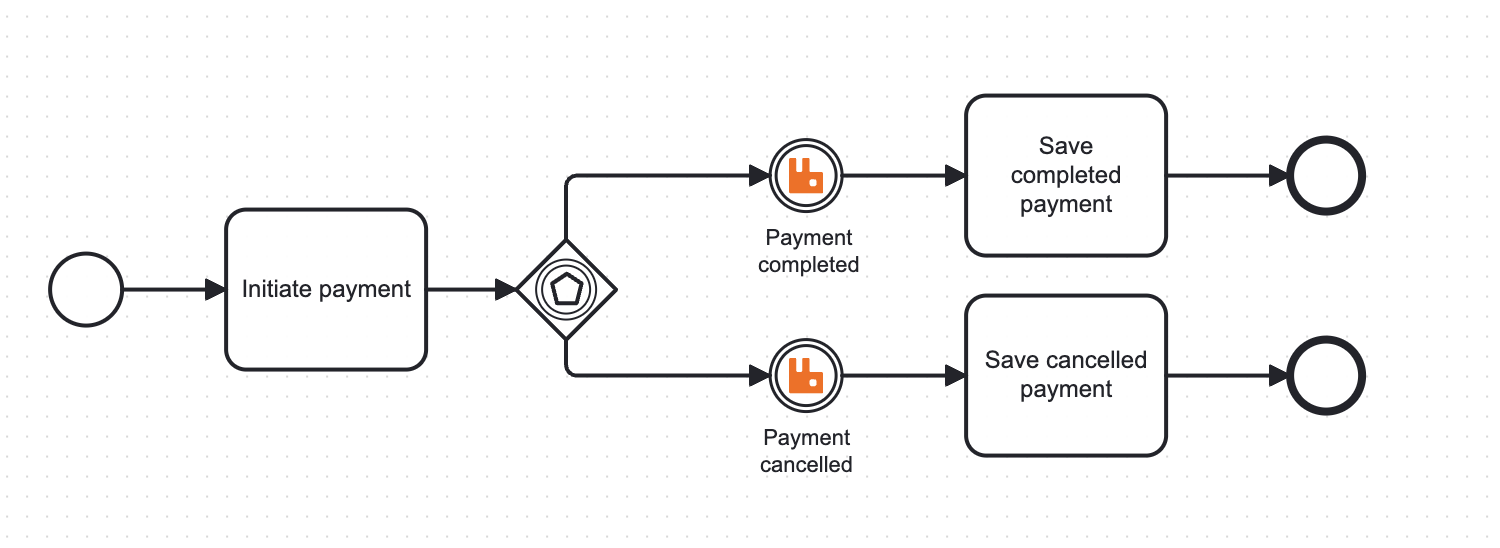
In this diagram, two connector events are listening to the same message queue that can contain messages of two types: PAYMENT_COMPLETED and PAYMENT_CANCELLED.
When the process execution arrives at the event gateway, the type of the message determines which path the process will take.
If each connector event listened to the message queue using a separate subscription, this might lead to race conditions if the message is received by a different consumer (for example, the PAYMENT_COMPLETED event being consumed by the consumer that expects PAYMENT_CANCELLED).
Eventually, this might lead to message loss or delayed processing, while also increasing the load on the message broker as the message is returned to the queue.
To avoid this, both events can be assigned to the same subscription by assigning the same deduplication ID to both events. Then, all messages will be consumed by the same subscription, and the connector runtime will evaluate the activation condition of each event to determine which one should be triggered.
When using this pattern, ensure each event’s activation condition is mutually exclusive, so only one event is triggered per message. Attempting to trigger multiple events for the same message will result in an error.
Automatic deduplication
By default, the connector runtime assigns the same deduplication ID to connector events with matching properties, and different IDs to events with different properties.
In this context, equal properties means the properties that define the business logic of the connector are exactly the same, including whitespace characters.
The automatic deduplication only takes into account the properties that are related to the business logic of the connector itself (for example, Server URL or Authentication properties). It does not take into account the properties that define output mapping (Result variable, Result expression, Response expression), correlation (Correlation key (process), Correlation key (payload), Activation condition), or other properties that are handled by the connector runtime and not by the connector itself.
This way, two connectors of the same type that are identical in terms of business logic and are defined in the same process definition will be deduplicated automatically.
Cross-version deduplication
In Camunda 8.9+, deduplication is performed across all versions of the same process definition. This means that if you deploy version 1 and version 2 of a process with the same compatible inbound connector, there will only be one executable connector instance serving both versions.
This behavior is a natural extension of support for inbound connectors across multiple process versions. When connector properties are identical across versions, the connector runtime automatically consolidates them into a single subscription or endpoint.
To learn more about how inbound connectors behave across process versions, see Inbound connector lifecycle.
Webhook connectors and multiple versions When using webhook connectors, you cannot reuse the same webhook endpoint for multiple process versions if you want to keep them both active simultaneously.
The default behavior is to keep the old version running when you deploy a new version that uses the same endpoint. The new version's connector will not become active until no process instances are running on the older version.
To keep both versions active:
- Complete all process instances on the older version before you deploy the new version.
- Or, use a different webhook endpoint path in the new version.
For more details, see Inbound connector lifecycle.
Manual deduplication
You can manually assign a deduplication ID to each connector event. This allows you to group connectors in a more flexible way based on your requirements.
If needed, you can have multiple connectors with the same properties that have different deduplication IDs. This way, you can still have multiple instances of the same connector listening to the same event source, but each instance will have its own deduplication ID and will be treated as a separate entity by the connector runtime.
To assign a deduplication ID, take the following steps:
- Enable the Manual mode checkbox in the Deduplication section of the connector properties.
- In Deduplication ID, enter the deduplication ID.
- Repeat the process for all connectors that should share the same deduplication ID.
- Deploy the BPMN diagram for the changes to take effect.

When manual deduplication is used, connectors that have the same deduplication ID must also have the same properties. Attempting to assign the same deduplication ID to connectors with different properties will result in a runtime error.
Should I use automatic or manual deduplication?
Use automatic deduplication if:
- You don't need to group connectors in a specific way and don't have any special requirements for deduplication.
- Deduplication configuration is not important for your use case (you don't use multiple connectors in the same process that listen to the same event source).
Use manual deduplication if:
- You need to group connectors in a specific way that is not supported by automatic deduplication.
- You are unsure which properties of the connector are used for automatic deduplication.
- You want to have more control over the deduplication process.
How to choose a deduplication ID
A deduplication ID can contain alphanumeric characters, dashes, and underscores. We recommend using a descriptive ID that reflects the deduplication group’s purpose, for example, payment-outcome-event-consumer.
Limitations of deduplication
While deduplication is a powerful tool that can optimize the execution of your BPMN process, it has some limitations. It is important to understand them to avoid unexpected behavior.
- Deduplication ID scope – The deduplication ID is scoped to a single process definition across all its versions. You can’t deduplicate connectors across different process definitions.
- Connector type – Connectors of different types can’t share the same deduplication ID (for example, a Webhook connector and a Message Queue connector).
- Connector properties – Connectors that share the same deduplication ID must use the same business-logic properties. This means they must have the same Webhook ID, Server URL, Authentication properties, and so on, depending on the connector type.
- Activation condition – Connectors with the same deduplication ID must have mutually exclusive activation conditions. If multiple connectors can evaluate to true for the same message, the connector runtime can’t determine which connector to trigger and returns an error.