Secrets
Use secrets to keep sensitive values out of process models, variables, and configuration. Learn how to reference a secret, where values are stored, how references resolve, and how access is controlled.
About
You can use and manage secrets to keep keep sensitive values such as API keys, passwords, and tokens, out of your process models, job variables, and configuration files.
Instead of writing a value into a model, you reference a secret stored in a secret store by name. Camunda resolves that reference to its value at runtime. The value is supplied only where it is needed, so it is never stored in the process itself.
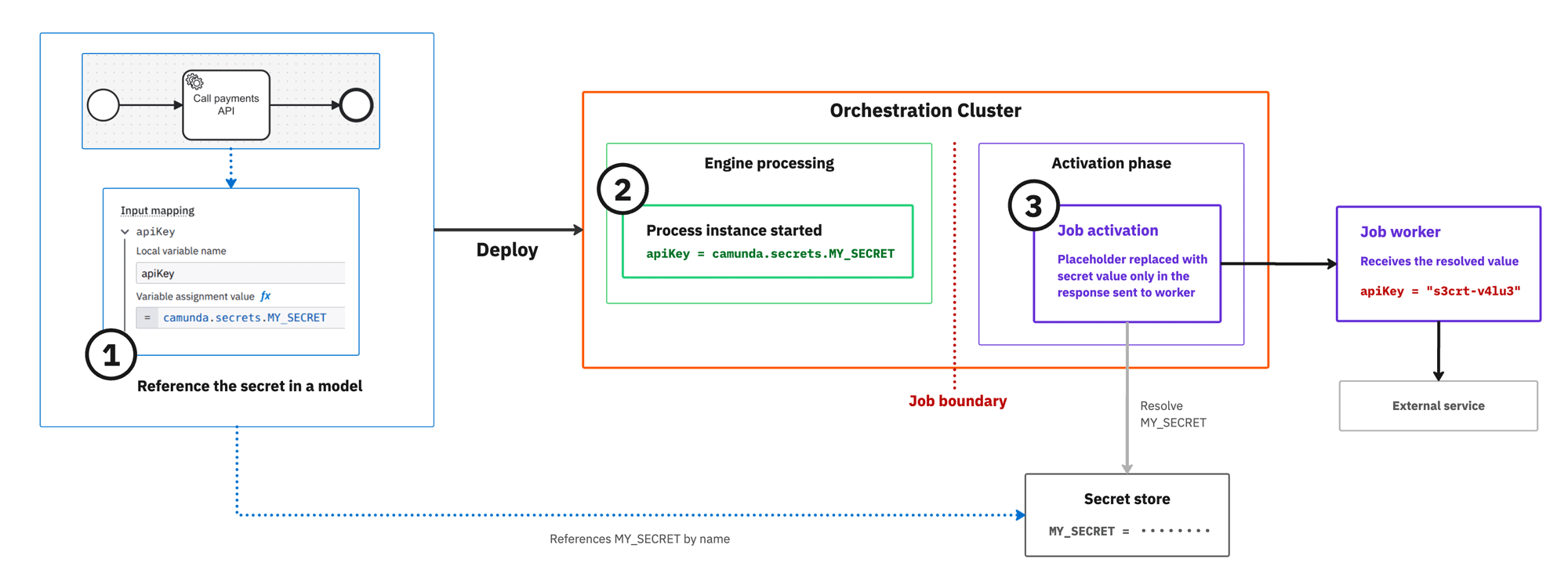
- Use a stored secret (for example,
MY_SECRET) in a model as a secret reference (camunda.secrets.MY_SECRET). - Once deployed and when the process instance starts, the Orchestration Cluster logs, stores, and exports the secret reference.
- Once the job is activated, the secret reference is resolved and replaced with the actual secret value from the secret store.
For precise definitions of secret-related terms, see the secret reference glossary entries.
Reference a secret
You can reference a secret in Camunda using a secret reference.
- This is a placeholder written into a model that stands in for a secret value.
- The recommended syntax is
camunda.secrets.<name>. This is resolved centrally by the Orchestration Cluster. - To learn how the backing store is configured in each offering, see using
camunda.secrets.*references and store and create secrets.
| Syntax | Resolved by | Where you use it |
|---|---|---|
camunda.secrets.<name> | Orchestration Cluster | Input mapping FEEL expressions, and connector or credential fields backed by a |
An older {{secrets.<name>}} syntax, resolved by the connector runtime, remains supported for existing connector models. See Legacy connector secrets.
For a working example of referencing camunda.secrets.<name> in a model, including the FEEL expression rules, see Secret references in input mappings.
Store and create secrets
A reference only resolves to a value once that value is available to the resolving component. How you create and store a secret depends on how you run Camunda 8:
| Deployment model | Secret storage and management |
|---|---|
| SaaS | The secret store is provisioned and managed for you.
See manage connector secrets and the SaaS-managed secret glossary entry. |
| Self-Managed | An operator supplies secret values by configuring a secret store (File, AWS Secrets Manager, or GCP Secret Manager). See secrets configuration. When deploying with the Helm chart, a Kubernetes Secret can back the configured store, for example as mounted files for a File store. See Helm charts secret management. |
| Local development | No store configuration is needed. You can manage secrets through
|
Resolve, list, and troubleshoot
- Secret resolution covers the reference syntax, the two resolution paths, tenant scope, and caching.
- Secret resolution and job activation covers the broker path: the scheduler, caching, and delivery to job workers.
- Troubleshoot secret resolution failures covers the incidents raised when a reference or its injection fails.
- Secrets covers the
POST /v2/secrets/resolveandPOST /v2/secrets/listAPI endpoints, and secrets covers the equivalent Java client commands.
Control access to secrets
The SECRET resource's READ and REVEAL permissions control who can list and reveal a secret via the /v2/secrets API. These permissions do not govern the broker resolving a reference for job activation.
See authorizations and secret authorizations don't cover broker-side resolution.
Legacy connector secrets
The legacy secret reference syntax, {{secrets.<name>}} is resolved by the connector runtime itself at execution time, and can be used in any connector field in the properties panel.
This syntax remains fully supported for existing connector models: "legacy" describes its age relative to camunda.secrets.<name>, not its support status. See using secrets to learn how to reference a legacy secret in a model, and the secret reference (legacy) glossary entry.
In Self-Managed, a connector secret provider supplies the values behind legacy references, for example from prefixed environment variables or a custom provider. When deploying with the Helm chart, a Kubernetes Secret can deliver these values as mounted environment variables. See Connector secrets in Self-Managed and Helm charts secret management.
Limitations
Compared to camunda.secrets.<name>, the legacy syntax has the following limitations:
| Limitation | Description |
|---|---|
| No field-scoped resolution | A legacy reference can resolve outside the field it was written in. The secret filter introduced with security notice 61 mitigates this; |
| No resource-based authorization | Legacy secrets have no SECRET resource permissions and rely on the secret filter instead. See control access to secrets. |
| No external secret store integration | Values come from connector secret providers, not from a File, AWS Secrets Manager, or GCP Secret Manager store. See secrets configuration for the stores camunda.secrets.<name> supports. |
In Self-Managed, set up the secret store and move your values there first. Then follow Migrate to camunda.secrets.<name>, which covers the step-by-step process, including the connector runtime's fallback mode for incremental migration.
Related resources
- The secret reference and its related glossary entries defines the terms used in these sections.
camunda.secrets.<name> (recommended)
- Secret references in input mappings covers referencing
camunda.secrets.<name>in a model, with examples. - Cluster secrets covers referencing SaaS-managed secrets as
camunda.secrets.<name>. - Secrets configuration covers configuring the secret store in Self-Managed.
- Migrate to
camunda.secrets.<name>covers moving from the legacy syntax, including the connector runtime's fallback mode.
{{secrets.<name>}} (legacy)
- Using secrets covers referencing secrets from connector fields.
- Cluster secrets covers creating and managing secret values in SaaS.
- Connector secrets in Self-Managed covers configuring connector secret providers.
- Cluster secrets in Camunda Process Test covers supplying secrets when you test processes.