Conditionals
Conditional events allow a process to react automatically when variables match a condition. Instead of waiting for a message or signal, the engine evaluates a FEEL expression over process variables and triggers the event when the expression becomes true.
Conditional events are similar to messages and signals, but they are triggered by variable changes instead of external correlation or broadcast.
For details on which BPMN event types support conditionals and how to model them, see the conditional events modeling guide.
Conditional event triggers
When a conditional event scope is activated, the engine creates a subscription. It evaluates the condition whenever relevant variables change within the event’s visible scope. If the condition becomes true while the event is active and in scope, the event triggers and the process follows the behavior defined by the underlying BPMN event.
The following sections describe how conditional events are evaluated and triggered, including how variable filters affect re-evaluation.
The semantics described below apply to conditional events within running process instances. For process-level conditional start events, see trigger root-level conditional start events via API.
On scope activation
When a scope is activated, the engine evaluates the condition for conditional events in that scope. For example, when an activity with an attached conditional boundary event is activated, the engine evaluates the condition for that boundary event immediately at activation.
Consider the following process definition:
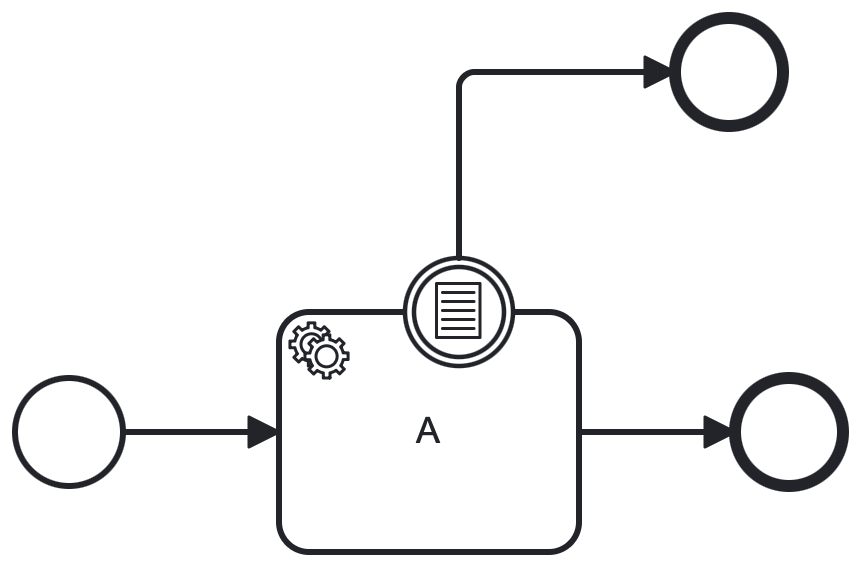
An interrupting conditional boundary event with condition x > 10 is attached to the service task A. Assume the process instance starts with variable x initialized to 11. When the start event completes and service task A is activated, the boundary condition evaluates to true, and the boundary event triggers immediately.
Service task A will be terminated and the created job will be canceled. The process instance will continue with the flow after the boundary event, skipping the service task A.
On variable changes
In addition to scope activation, conditional events can also be triggered when relevant variables change within the event’s visible scope. When a variable changes (for example, it is created or updated), the engine evaluates the condition for any active conditional events in the variable's scope and all child scopes whose condition depends on that variable (see top-down evaluation).
Given the following process definition:
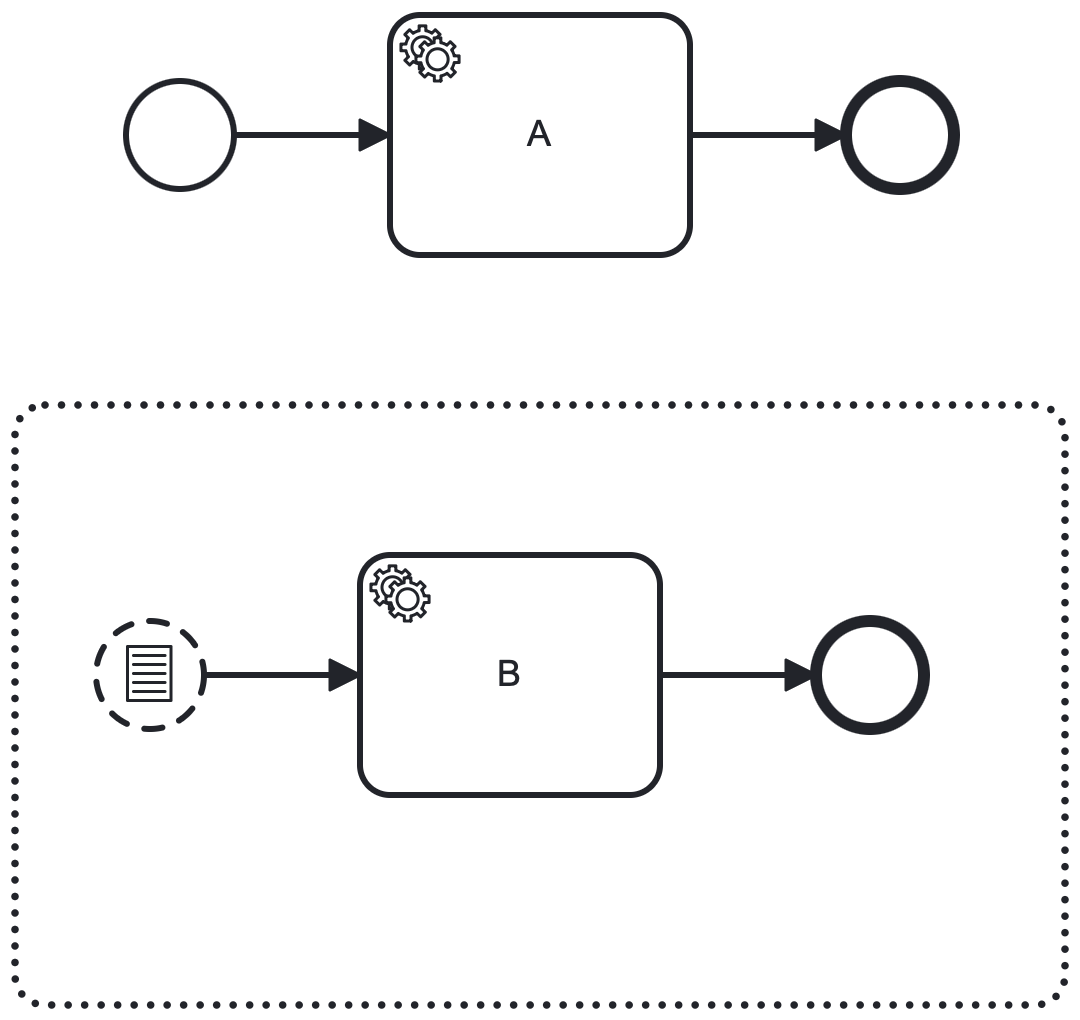
An event sub-process with a conditional start event is defined with condition x > 10. Assume the process instance starts with variable x initialized to 5. The main process starts and executes the service task, while the event sub-process is not triggered because the condition is not satisfied.
If the process instance updates variable x to 11 (for example, via the update element instance variables API), the engine evaluates the condition for the conditional start event in the event sub-process. Since the condition is now true, the conditional start event triggers and the event sub-process starts.
Top-down evaluation
When a variable changes, the engine evaluates conditions in a top-down order based on scopes. Starting from the scope where the variable changed, the engine evaluates conditions for any active conditional events in that scope. It then evaluates conditions in child scopes, continuing down the hierarchy. This continues until a triggered event interrupts one of the scopes or there are no more child scopes to evaluate.
Given the following process definition:
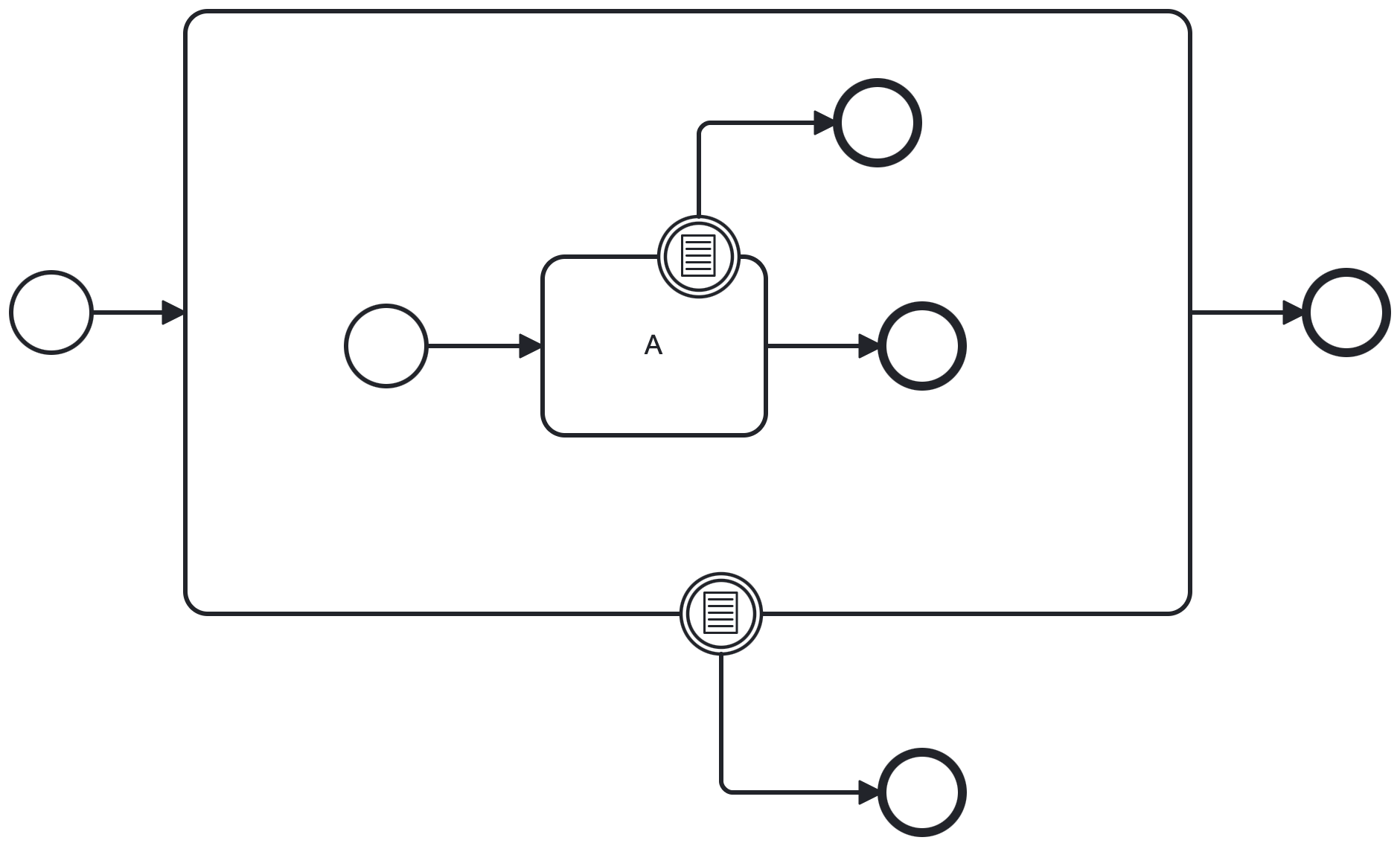
If a variable is set within the scope of the root process instance or sub-process instance, the engine evaluates the sub-process’s conditional boundary event first. If the condition is satisfied, execution is interrupted; otherwise, the engine evaluates the conditional boundary event on the inner service task A and triggers it if its condition is satisfied.
Scope isolation
A variable change can trigger only the conditional events that can see that variable in the current scope or one of its child scopes. Unrelated scope instances are not affected.
Given the following process definition:
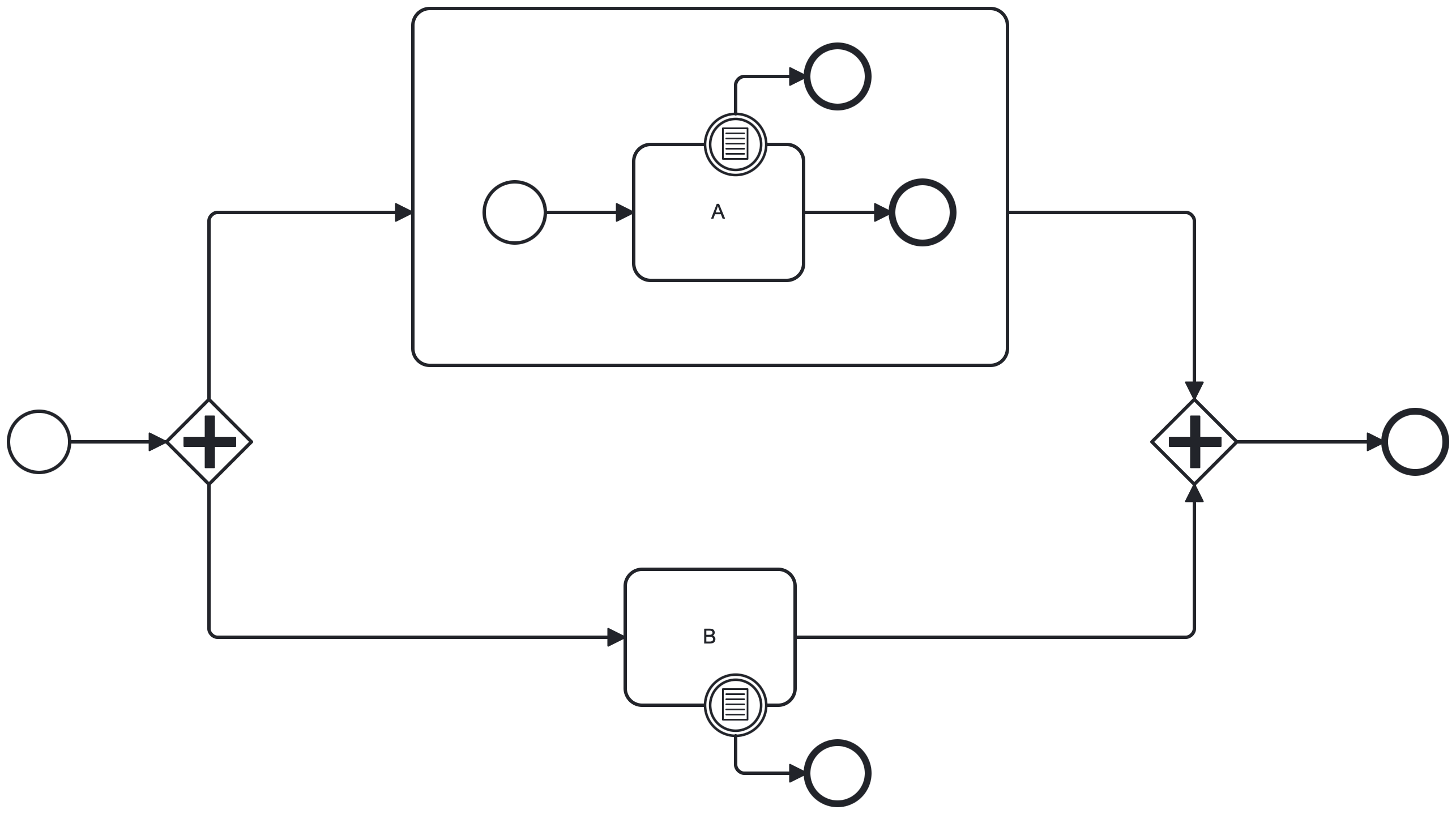
Service task A and service task B are active in parallel branches of the process. If a variable is set in the sub-process instance, then only the conditional boundary event on service task A is evaluated. The boundary event on service task B cannot trigger because the variable is not visible in its scope. See variable scopes for more details on variable visibility rules.
Expression-based evaluation
When a conditional event is activated, the engine analyzes its FEEL condition and derives which variables the expression depends on. The subscription is re-evaluated only when one of those referenced variables changes within the event’s visible scope.
The following rules apply to condition expressions:
- Condition
x > 1is re-evaluated only when variablexchanges. - Condition
x > 1 and y < 5is re-evaluated when either variablexor variableychanges. - Condition
x.y.z = trueis re-evaluated when variablexchanges, because the expression depends on the value ofx(even if it accesses a property ofx).
Use plain FEEL expressions instead of nested variable access (for example, x > 1 instead of x.value > 1).
This helps the engine derive variable dependencies correctly and re-evaluate the condition when relevant variables change.
If you use nested variable access, the engine treats the entire variable as a dependency.
For example, if the condition is x.value > 1, the engine treats x as a dependency.
The condition is re-evaluated every time x changes, even if the change does not affect value.
This can lead to unintended triggers for non-interrupting conditional events if variable x is updated frequently.
Variable filter semantics
Conditional events can define variable filters to limit when the engine re-evaluates the condition. By default, the engine derives the set of variables that can trigger an event from the FEEL expression. The subscription is re-evaluated only when one of those referenced variables changes within the event’s visible scope. See how filters can be defined in the conditional events modeling guide.
Variable filters restrict evaluation based on specific variable change types (for example, create or update).
Variable change type filters apply only to conditional events within a running process instance. They do not apply to root-level conditional start events, because no process instance exists yet.
Considerations
Conditional events enable reactive process behavior, but incorrect modeling can lead to unintended triggers. Keep the following behavior in mind.
Single evaluation per state update
If a single command (for example, an update variables request or job completion) updates multiple variables and more than one satisfies the condition, the subscription triggers only once.
Using the process definition shown earlier (a service task with an interrupting conditional boundary event), assume the boundary condition is x > 10 or y > 5.
If both variables x and y are updated in a single request (for example, via the update element instance variables API) and both satisfy the condition, the boundary event triggers only once.
Input mappings behavior
If an activity defines an input mapping that sets a variable satisfying the boundary condition, the conditional boundary event can trigger when the activity is activated.
Output mappings behavior
If an activity defines an output mapping that sets a variable satisfying the boundary condition, the conditional boundary event does not trigger when the activity completes.
The engine removes the boundary subscription when the activity completes. Variables written during completion are applied after the subscription is removed.
Using the same process definition shown earlier (a service task with an interrupting conditional boundary event), if service task A completes and sets variable x to 11, the boundary event with condition x > 10 does not trigger because the subscription has already been removed.
Multi-instance behavior
The behavior of conditional boundary events depends on where the variable is updated.
- With an interrupting conditional boundary event on the multi-instance body, a child instance that updates a variable and satisfies the condition can interrupt the entire multi-instance activity.
- With a non-interrupting conditional boundary event on the multi-instance body, each child instance that satisfies the condition triggers its own boundary event without interrupting the multi-instance body.
- A local-scope variable update on a multi-instance child triggers the boundary event only for that child instance. Other child instances continue unaffected.
- A process-scope variable update that is visible to all multi-instance children triggers boundary events on all active child instances whose conditions evaluate to
true.
Trigger root-level conditional start events via API
You can evaluate root-level conditional start events by using:
- The Orchestration Cluster REST API. See evaluate root-level conditional start events.
- The Zeebe gateway gRPC API. See
EvaluateConditionalRPC. - Client SDKs. For example, use
newEvaluateConditionalCommand()in the Java client.
When you evaluate conditional start events:
- Multiple conditional start events in the same process definition can trigger if their conditions evaluate to
true, which can start multiple process instances from the same definition. - If you do not specify a
processDefinitionKey, the engine evaluates all root-level conditional start events across all deployed process definitions and starts instances for those whose conditions evaluate totrue.
These APIs apply only to root-level conditional start events.
Conditional events inside running process instances are evaluated automatically when variables change.
Migration from Camunda 7
In Camunda 7, conditional events use the camunda:variableName and camunda:variableEvents attributes.
In Camunda 8, the FEEL condition expression is the single source of truth for which variables can trigger the event.
The camunda:variableName attribute is not supported, so the engine derives variable dependencies directly from the FEEL expression.
During migration, camunda:variableEvents is converted into a variableEvents filter configuration where applicable.
Camunda 8 supports only create and update. If a model uses delete in Camunda 7, migration maps it to the closest supported behavior.