Variables
Variables are part of a process instance and represent the data of the instance.
A variable has a name and a JSON value. The visibility of a variable is defined by its variable scope.
When automating a process using BPMN, orchestrating human tasks, or implementing agentic orchestration, you can leverage the scope of these variables and customize how variables are merged into the process instance.
Variable names
The name of a variable can be any alphanumeric string including the _ symbol. For a combination of words, it's recommended to use the camelCase or the snake_case format. The kebab-case format is not allowed because it contains the operator -.
When accessing a variable in an expression, keep in mind the variable name is case-sensitive.
Restrictions of a variable name:
- It may not start with a number (e.g.
1stChoiceis not allowed; you can usefirstChoiceinstead). - It may not contain whitespaces (e.g.
order numberis not allowed; you can useorderNumberinstead). - It may not contain an operator (e.g.
+,-,*,/,=,>,?,.). - It may not be a literal (e.g.
null,true,false) or a keyword (e.g.function,if,then,else,for,between,instance,of,not). - It must stay within the length limits of the target backend: up to 32,768 characters with Elasticsearch/OpenSearch-backed secondary storage and up to 256 characters with RDBMS-backed secondary storage.
Length is enforced using Java string length semantics rather than raw UTF-8 byte counts. Most common characters count as one character, while characters represented as surrogate pairs in Java count as two. Because of that, the effective visible-character limit can be lower for some inputs.
Variable values
The value of a variable is stored as a JSON value. It can have one of the following types:
- String (e.g.
"John Doe") - Number (e.g.
123,0.23) - Boolean (e.g.
trueorfalse) - Array (e.g.
["item1" , "item2", "item3"]) - Object (e.g.
{ "orderNumber": "A12BH98", "date": "2020-10-15", "amount": 185.34}) - Null (
null)
Numbers are subject to the following numeric limits:
- Integer numbers are effectively limited to the 64‑bit integer range.
- Non‑integer numbers are stored as IEEE‑754 double‑precision values, which provide roughly 15–17 significant decimal digits rather than arbitrary BigDecimal precision.
If you need arbitrary-precision or very large numbers, consider storing them as strings or in an external data store instead of process variables.
A date-time value with a time zone ID, for example from now(), is stored with the zone ID in brackets, such as 2026-09-29T12:31:01.641Z[GMT]. Some ISO 8601 parsers reject this format, for example Python datetime.fromisoformat() and JavaScript new Date(). To store the value without the zone ID, convert it to a fixed offset before storing it, for example date and time(now(), "Z").
Variable size limitation
The payload of a process instance is limited to 4 MB. This limit includes both process variables and workflow engine–internal data, so less than 4 MB is available for variables alone.
The effective limit depends on the operation. As a rule of thumb, ~1.5 MB is considered safe for commands or events that include variables, such as starting a process instance or completing a job. In these cases, the engine may append follow-up records that temporarily duplicate the variable payload within the same batch.
To avoid production issues, leave headroom below the limit—for example, target ≤1 MB—and validate with a production-like test case. If the payload size is uncertain, run a quick test to confirm behavior.
Regardless, we don't recommend storing much data in your process context. Refer to our best practice on handling data in processes.
Variable scopes
Variable scopes define the visibility of variables. The root scope is the process instance itself. Variables in this scope are visible everywhere in the process.
When the process instance enters a subprocess or an activity, a new scope is created. Activities in this scope can observe all variables of this and of higher scopes (i.e. parent scopes). However, activities outside of this scope can not observe the variables which are defined in this scope.
If a variable has the same name as a variable from a higher scope, it covers this variable. Activities in this scope observe only the value of this variable and not the one from the higher scope.
The scope of a variable is defined when the variable is created. By default, variables are created in the root scope.
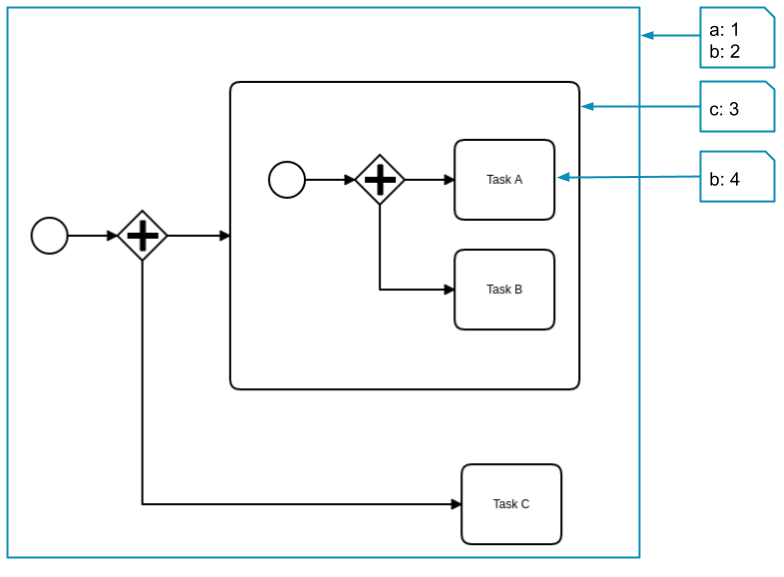
This process instance has the following variables:
aandbare defined on the root scope and can be seen by Task A, Task B, and Task C.cis defined in the subprocess scope and can be seen by Task A and Task B.bis defined again on the activity scope of Task A and can be seen only by Task A. It covers the variablebfrom the root scope.
Variable propagation
When variables are merged into a process instance (e.g. on job completion, on message correlation, etc.) each variable is propagated from the scope of the activity to its higher scopes.
The propagation ends when a scope contains a variable with the same name. In this case, the variable value is updated.
If no scope contains this variable, it's created as a new variable in the root scope.
What an element propagates when it completes, and whether it propagates anything at all, depends on the BPMN element type. See variable propagation by BPMN element for the full breakdown.
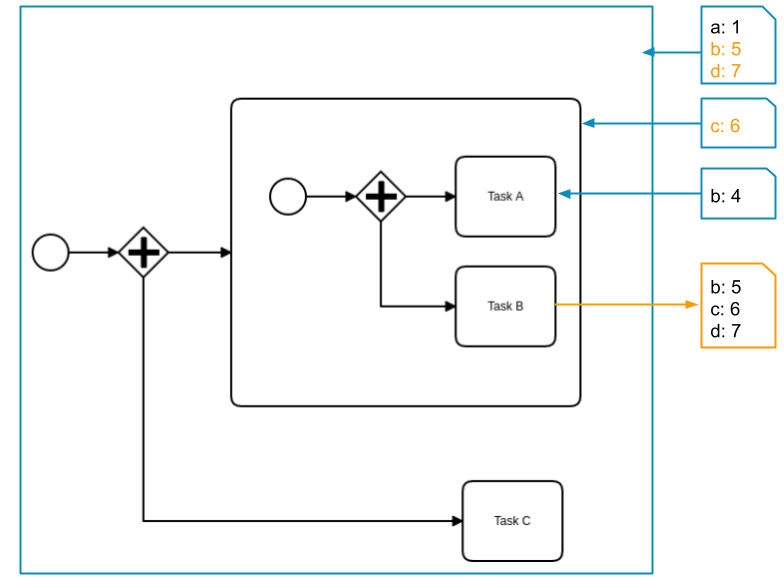
The job of Task B is completed with the variables b, c, and d. The variables b and c are already defined in higher scopes and are updated with the new values. Variable d doesn't exist before and is created in the root scope.
Variable propagation by BPMN element
What an element propagates to its parent scope when it completes depends on its type:
| BPMN element | What propagates on completion |
|---|---|
| Service, send, user, receive, script, and business rule tasks | The task result: the job result, correlated message payload, or evaluated expression. With an output mapping, only the mapped variables propagate; without one, the whole result propagates. |
| Embedded and event subprocesses | Nothing by default. Local variables are discarded when the subprocess completes unless an output mapping propagates them. |
| Call activity | By default, all variables of the child process instance, because propagateAllChildVariables is enabled. With an output mapping, only the mapped variables. If you disable propagateAllChildVariables and define no output mapping, nothing propagates. |
| Ad-hoc subprocess | Its output collection, if configured, plus any variables an output mapping propagates. Variables written by its activated activities stay local to each activation. |
| Multi-instance activity | Its output collection, if configured, pushed to the parent scope when the loop finishes. The loopCounter variable and the per-instance input element variable stay local to each instance. |
| Start, intermediate catch, and boundary events | The correlated event payload (message, signal, timer, or conditional), or the mapped variables if an output mapping is defined. |
| Throw and end events | Only the mapped variables where output mappings are supported, or, for message and signal variants backed by a job or connector, the job result. The none, link, and escalation variants propagate nothing without a mapping. The error, terminate, and compensation variants do not support output mappings and propagate nothing. |
A call activity that disables propagateAllChildVariables without defining an output mapping discards everything the child process produced. To return only selected child process variables to the caller, keep propagateAllChildVariables enabled and define an output mapping on the call activity.
An error end event does not propagate variables through output mappings. Any payload it carries travels to the catching boundary event or event subprocess instead.
Internal engine variables
Some variables are created and managed by the engine to control execution. They are scoped locally to the element instance that uses them and are not intended as process data:
loopCounter: the current iteration index inside a multi-instance activity. Read it within an iteration, but do not propagate it to higher scopes.- The multi-instance input element variable: the item assigned to the current iteration from the input collection. Its name is set by the
inputElementattribute, and it stays local to that iteration.
Avoid referencing these variables in output mappings. Propagating them beyond their intended scope can produce incorrect results.
Local variables
In some cases, variables should be set in a given scope, even if they didn't exist in this scope before.
This is possible with local variables. Use local variables to create or update variables in a given scope, regardless of whether they existed in this scope before.
Define local variables
To define a local variable in Camunda Hub or Desktop Modeler, add an input mapping on the activity, subprocess, or call activity where you want the variable to exist. For details on input mapping concepts (source and target) see input/output variable mappings.
The target of the input mapping becomes a local variable in that element's scope. For example, an input mapping with source: =customer.name and target: reviewerName creates the local variable reviewerName in that scope.
Scope behavior in common modeling patterns
The scope boundary depends on the BPMN element you use:
| Pattern | Scope behavior |
|---|---|
| Embedded subprocess | Creates a local scope inside the same process instance. Local variables stay inside the subprocess unless you propagate them with output mappings. Root-scope process variables are still shared, so parallel or multi-instance embedded subprocess instances can overwrite the same process variable. |
| Call activity | Starts a new process instance with its own variable scope. Configure the call activity's parent variable propagation settings and input mappings to control which variables the child receives. Use the call activity's child variable propagation settings and output mappings to control which variables are returned to the caller. |
| Multi-instance activity | Each instance has its own local scope. Use input mappings to create per-instance local variables, especially in parallel multi-instance activities, to avoid race conditions when multiple instances update the same process variable. |
If a form field or task variable should be different for each subprocess or each multi-instance instance, define it as a local variable with an input mapping instead of writing it directly to the root process scope.
Use local variables to isolate data within a specific scope: per-instance data in multi-instance activities (to avoid race conditions when parallel instances update the same root process variable), subprocess-specific data that shouldn't affect sibling instances or the parent scope, and task-specific context that shouldn't persist to the process level. Local variables are removed when a scope is exited unless you explicitly propagate them with output mappings.
If another operation writes a variable with the same name, variable propagation finds the local variable first. This happens when a job completes or an input mapping creates the variable.
Later writes update only the local variable, not the process instance. When the scope exits, Camunda discards the local variable and any updates. The operation appears to succeed, but the change never propagates.
For example, an input mapping creates a local variable x. When the element's job completes with a new value for x (without an output mapping), it updates the local x, not the process instance. The next element still sees the previous value.
To expose a variable outside its scope, use an output mapping.
Input/output variable mappings
Input/output variable mappings can be used to create new variables or customize how variables are merged into the process instance.
Variable mappings are defined in the process as extension elements under ioMapping. Every variable mapping has a source and a target expression.
The source expression defines the value of the mapping. It usually accesses a variable of the process instance that holds the value. If the variable or nested property doesn't exist, the value resolves to null. The same applies if you do not provide a source.
The target expression defines where the value of the source expression is stored. It can reference a variable by its name or a nested property of a variable. If the variable or the nested property doesn't exist, it's created.
Variable mappings are evaluated in the defined order. Therefore, a source expression can access the target variable of a previous mapping.
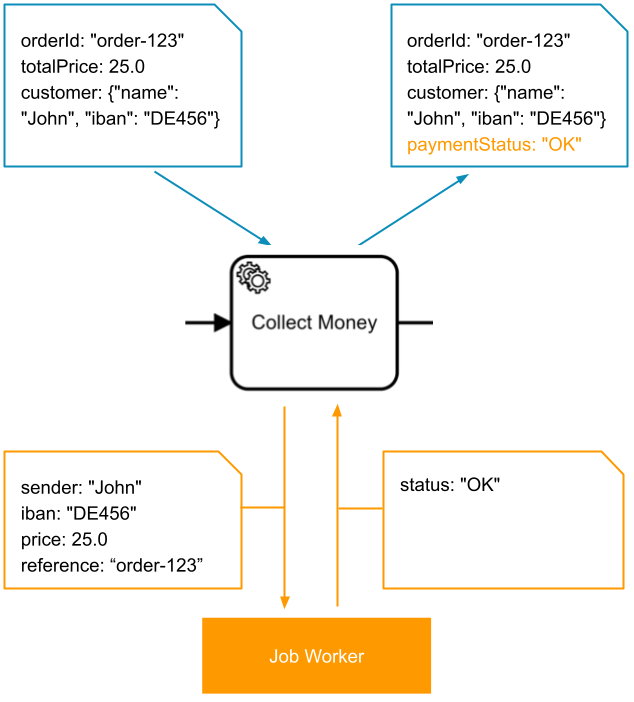
Input mappings
| Source | Target |
|---|---|
customer.name | sender |
customer.iban | iban |
totalPrice | price |
orderId | reference |
Output mapping
| Source | Target |
|---|---|
status | paymentStatus |
Input mappings
Input mappings can be used to create new variables. They can be defined on service tasks, script tasks, business rule tasks, call activities, user tasks, send tasks, subprocesses, event subprocesses, and ad-hoc subprocesses. Support depends on the element type. See the element's own page for details.
When an input mapping is applied, it creates a new local variable in the scope where the mapping is defined.
In Camunda Hub or Desktop Modeler, define these mappings in the element properties.
You can use expressions or static values for input mappings. You can leave the source empty to map the target variable to null.
For string literals containing escaped characters (e.g., a newline character \n), the string is returned in its original form as expected (no double escaping is applied).
Examples:
| Process variables | Input mappings | New variables |
|---|---|---|
orderId: "order-123" | source: =orderIdtarget: reference | reference: "order-123" |
customer:{"name": "John"} | source: =customer.nametarget: sender | sender: "John" |
customer: "John"iban: "DE456" | source: =customertarget: sender.namesource: =ibantarget: sender.iban | sender: {"name": "John", "iban": "DE456"} |
| - | source: "Peter"target: sender | sender: "Peter" |
customer:{"name": "John"} | source: (not provided) target: customer | customer: null |
Secret references in input mappings
An input mapping's source can reference a secret directly, without first storing it in a process variable. Write the reference as camunda.secrets.<name> in a FEEL expression.
Using secret references requires a secret store that holds the secret. In SaaS, the store is provisioned for you. You can reference values from the cluster's Cluster secrets tab as camunda.secrets.<name> without additional setup. See manage connector secrets. In Self-Managed, an operator must configure a secret store. Without an available store, Camunda cannot resolve the reference.
| Process variables | Input mappings | New variables |
|---|---|---|
| - | source: =camunda.secrets.API_TOKENtarget: token | token holds the secret's value when the job reaches the worker |
| - | source: ="Bearer " + camunda.secrets.API_TOKENtarget: authorization | authorization holds "Bearer " followed by the secret's value |
Secret references are only resolved in input mappings defined on elements that create a job for a job worker (for example, service tasks, business rule tasks, and ad hoc sub-processes). See secret resolution and job activation for how a reference is resolved and what the worker receives once the job is handed out. The stored process variable always holds the placeholder text camunda.secrets.<name>; resolution replaces it only in the payload handed to the worker, not in the variable kept in the process instance's state. Any other consumer of that variable sees the placeholder.
A reference must be an expression, and the reference itself must be exactly the three-segment path camunda.secrets.<name>. It can still take part in a supported expression, such as the concatenation shown above, but the following rejections apply:
-
Writing the reference as a plain string, or quoting it inside an expression, is rejected at deployment rather than passed through as literal text:
="camunda.secrets.API_TOKEN"Secret reference(s) 'camunda.secrets.API_TOKEN' must be used as an expression (e.g. '=camunda.secrets.<name>'), not as a string literal, in input mapping source '="camunda.secrets.API_TOKEN"'. -
A trailing path after the name, such as
camunda.secrets.API_TOKEN.length, is not treated as a reference. It's evaluated as an ordinary FEEL path access instead. -
A reference placed inside a list, or inside a context built by an
ifbranch, is rejected at deployment, because the reference is no longer a value the mapping assigns directly:=[camunda.secrets.API_TOKEN]Input mapping source '=[camunda.secrets.API_TOKEN]' puts a secret reference inside a list, or inside a context built by an 'if' branch. Camunda can only replace a secret where the mapping assigns it directly to a value, so this secret would never be filled in. Assign each secret reference to its own input mapping instead.
Give each secret its own input mapping. A later mapping that reads the variable created by an earlier one, rather than writing camunda.secrets.<name> itself, does not get the secret resolved:
| Input mappings | New variables |
|---|---|
source: =camunda.secrets.API_TOKENtarget: xsource: =xtarget: y | x exposes the resolved secret value to the worker; y holds the literal placeholder text, not the secret value |
A secret reference can also come from a cluster variable of kind SECRET_REFERENCE. An input mapping that selects such a variable, for example =camunda.vars.env.MY_CONFIG, resolves the camunda.secrets.<name> references embedded in its value the same way. See resolve secret references in a cluster variable.
Avoid using camunda as a process variable name. A process variable literally named camunda takes precedence over the secret namespace, so camunda.secrets.<name> resolves against that variable and no secret is injected.
Escape secret names with special characters
A secret name containing a character FEEL doesn't allow in a bare identifier (most commonly a dash) must be backtick-escaped, the same way any other FEEL name with special characters is:
=camunda.secrets.`db-password`
Without the backticks, camunda.secrets.db-password parses as a subtraction (db minus password). FEEL reads the left operand as a reference named db, which is not a valid secret reference, so the deployment fails at evaluation.
When a reference is written directly in an input mapping source, backtick escaping accepts any name, including a name your secret store accepts but the /v2/secrets endpoints do not. Those endpoints list and resolve only names matching [\p{Alnum}_-]+. A name outside that set, such as tls.crt, can be backtick-escaped and resolved from a process model (=camunda.secrets.`tls.crt` ) if your secret store holds it under that name, but the same secret cannot be listed or resolved through /v2/secrets. This applies to references written directly in an input mapping source, not to references embedded in a SECRET_REFERENCE-kind cluster variable value, whose names follow the restricted cluster-variable character set.
Output mappings
Output mappings can be used for several purposes:
- To customize how variables are merged into the process instance.
- They can be defined on most tasks (service, send, user, receive, script, and business rule tasks), embedded and event subprocesses, call activities, and ad-hoc subprocesses.
- They can also be defined on many events, including message, signal, timer, and conditional catch events, boundary events, and start events.
If one or more output mappings are defined, the results variables are set as local variables in the scope where the mapping is defined. Then, the output mappings are applied to the variables and create new variables in this scope. The new variables are merged into the parent scope. If there is no mapping for a job/message variable, the variable is not merged.
This can lead to a case where some variables with an output mapping are merged into the parent scope, and others without an output mapping are not merged.
If no output mappings are defined, the behavior depends on the element. Tasks and events that produce a result (a job result, or a correlated message or signal payload) merge that whole result into the parent scope. Subprocesses and events that produce no result, such as none, link, escalation, and compensation events, propagate nothing; their local variables are discarded when the scope is left. For an overview across all element types, see variable propagation by BPMN element.
In the case of a subprocess, the behavior is different. There are no results variables to be merged. However, output mappings can be used to propagate local variables of the subprocess to higher scopes. By default, all local variables are removed when the scope is left.
Examples:
| Results variables | Output mappings | Process variables |
|---|---|---|
status: "Ok" | source: =statustarget: paymentStatus | paymentStatus: "OK" |
result: {"status": "Ok", "transactionId": "t-789"} | source: =result.statustarget: paymentStatussource: =result.transactionIdtarget: transactionId | paymentStatus: "Ok"transactionId: "t-789" |
An output mapping target that contains a period (for example, order.status) updates only the final property and merges it into the existing variable at that path, leaving sibling properties untouched. This is supported, but use it deliberately, as it modifies a property of an existing variable rather than replacing the whole variable. For details, see nested variables in mappings.
Nested variables in mappings
Input and output mappings build nested target paths in opposite ways:
- Input mappings treat the
targetas a full path and write the entire nested object at that path, replacing any value already there. - Output mappings write only the final property (the leaf) of the
targetpath and merge it into the existing structure, preserving sibling properties that are already present.
For example, an input mapping with target order replaces the whole order variable, while an output mapping with target order.status sets only status inside an existing order variable and leaves its other properties unchanged.
Context variable
A context variable is a reserved variable that describes the context of a task. It can group variables together to provide a detailed description of the task or offer more descriptive data about it.
The reserved variable name for a context variable is taskContextDisplayName. This name is reserved exclusively for this purpose and should not be used for other variables.
Context variables were a Tasklist V1 feature and are not supported in current Tasklist releases. See Tasklist API changes.
Example:
| Input variable | Example |
|---|---|
taskContextDisplayName | This is a context variable example |
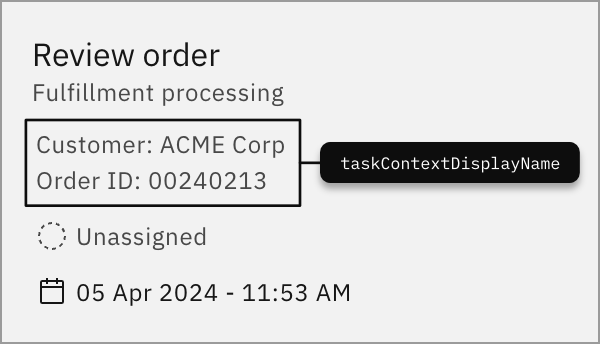
The data from the variable will be shown on the task tile, as shown in the example below:
Next steps
- Understand how to access variables.
- Explore how to centrally manage cluster configuration with cluster variables.