Asana connector
Connect your BPMN service with Asana to get, create, and delete Asana tasks and projects.
About this connector
The Asana connector is an outbound protocol connector built on top of the REST connector. It calls the Asana API for you, so you select an operation and fill in its parameters instead of building the HTTP request yourself.
For example, use this connector to create an Asana task when a process instance reaches a manual review step, or to look up the tasks of a project.
Prerequisites
To use the Asana connector, you need an Asana personal access token.
Use secrets to avoid exposing your Asana personal access token as plain text. Refer to our documentation on managing secrets to learn more.
Create an Asana connector task
You can apply a connector to a task or event via the append menu. For example:
- From the canvas: Select an element and click the Change element icon to change an existing element, or use the append feature to add a new element to the diagram.
- From the properties panel: Navigate to the Template section and click Select.
- From the side palette: Click the Create element icon.
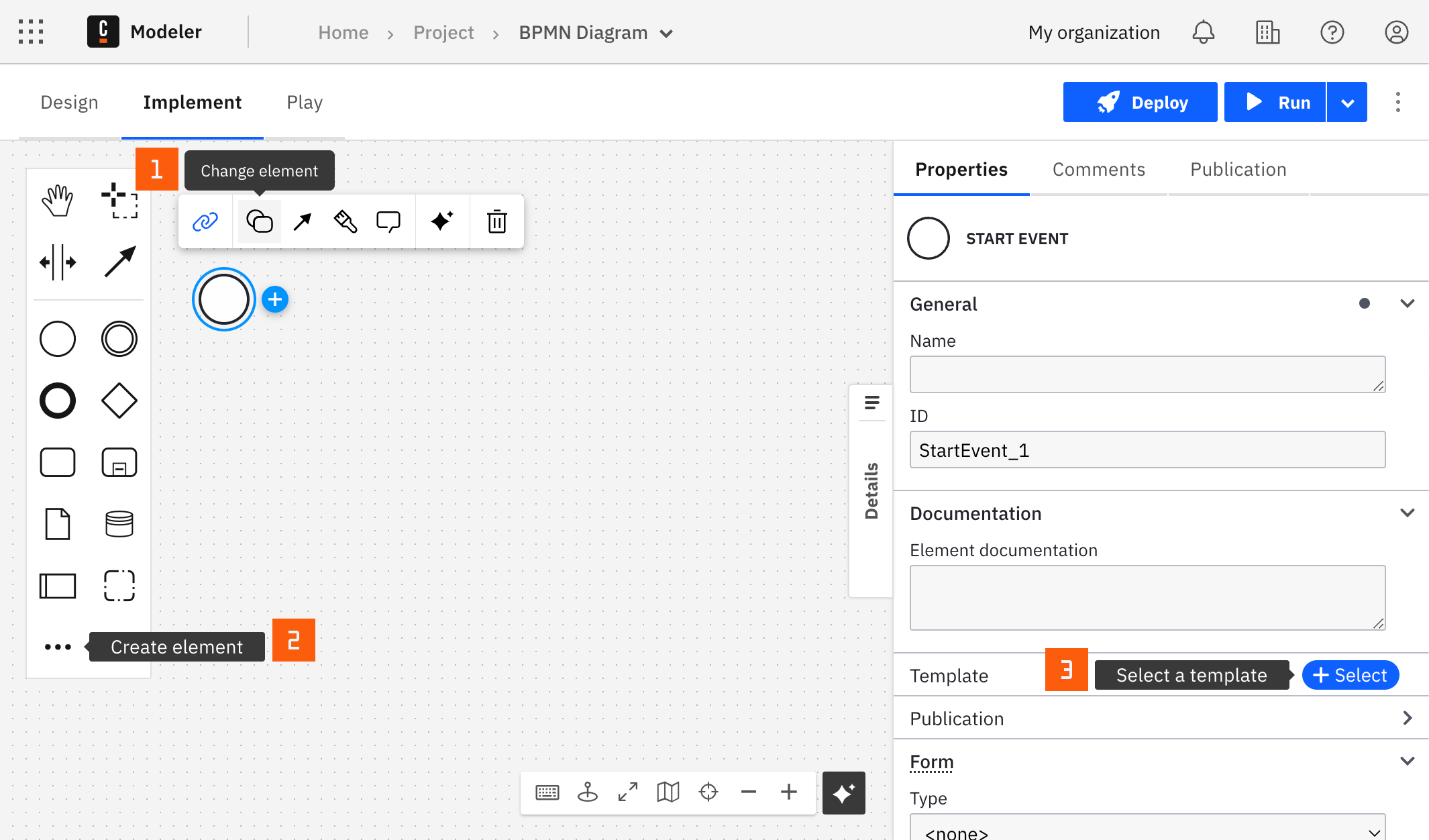
After you have applied a connector to your element, follow the configuration steps or see using connectors to learn more.
Configuration
Authentication
| Property | Type | Required | Description | Example |
|---|---|---|---|---|
| Personal access token | String | Yes | Your Asana personal access token. Learn how to obtain a token in the Asana documentation. | {{secrets.ASANA_PAT}} |
Operation
Use the Operation group dropdown to choose Tasks or Projects, then select the operation in the Operation dropdown.
| Property | Type | Required | Description | Example |
|---|---|---|---|---|
| Operation group | Dropdown | Yes | The kind of Asana object to work with: Tasks or Projects. | Tasks |
| Operation | Dropdown | Yes | The operation to run. The available options depend on the operation group. |
Operations
Tasks
Get tasks from a project
Returns the tasks of a project. Uses the Asana API operation Get tasks from a project.
Input parameters
| Property | Type | Required | Description | Example |
|---|---|---|---|---|
| Project ID | String | Yes | Globally unique identifier for the project. |
Get a task by ID
Returns a single task. Uses the Asana API operation Get a task.
Input parameters
| Property | Type | Required | Description | Example |
|---|---|---|---|---|
| Task ID | String | Yes | The task to operate on. |
Create a task
Creates a task in a project. Uses the Asana API operation Create a task.
Input parameters
| Property | Type | Required | Description | Example |
|---|---|---|---|---|
| Task name | String | Yes | The name of the task. | |
| Project ID | String | Yes | Globally unique identifier for the project. | |
| Parent task ID | String | No | Globally unique identifier for the parent task. | |
| Notes | String | No | Free-form textual information associated with the task (that is, its description). |
Delete a task
Deletes a task. Uses the Asana API operation Delete a task.
Input parameters
| Property | Type | Required | Description | Example |
|---|---|---|---|---|
| Task ID | String | Yes | The task to operate on. |
Projects
Get projects
Returns multiple projects, optionally filtered. Uses the Asana API operation Get multiple projects.
Input parameters
| Property | Type | Required | Description | Example |
|---|---|---|---|---|
| Workspace ID | String | No | The workspace or organization to filter projects on. | |
| Team ID | String | No | The team to filter projects on. |
Get a project by ID
Returns a single project. Uses the Asana API operation Get a project.
Input parameters
| Property | Type | Required | Description | Example |
|---|---|---|---|---|
| Project ID | String | Yes | Globally unique identifier for the project. |
Create a project in a workspace
Creates a project in a workspace. Uses the Asana API operation Create a project in a workspace.
Input parameters
| Property | Type | Required | Description | Example |
|---|---|---|---|---|
| Workspace ID | String | Yes | Globally unique identifier for the workspace or organization. | |
| Project name | String | Yes | Name of the project. Generally a short sentence fragment that fits on a line in the UI for maximum readability. However, it can be longer. | |
| Project note | Text | No | Free-form textual information associated with the project (that is, its description). |
Delete a project
Deletes a project. Uses the Asana API operation Delete a project.
Input parameters
| Property | Type | Required | Description | Example |
|---|---|---|---|---|
| Project ID | String | Yes | Globally unique identifier for the project. |
Output
The Asana connector is built on top of the REST connector, so the response is the HTTP response of the Asana API call. In the Result expression, you can use response.status, response.headers, and response.body. Read the REST connector response for details.
Asana returns the requested object or list in the data property of the response body. For example, to keep only the ID of a created task:
= {
    taskId: response.body.data.gid
}
Troubleshooting
To handle errors returned by the Asana API, see error handling in the REST connector documentation. For general configuration of outbound connectors, such as retries, see configure the outbound connector.