Amazon SQS inbound connector
Use the Amazon SQS inbound connector to receive messages from a queue in Amazon Simple Queue Service (Amazon SQS) and start or continue a BPMN process.
About this connector
The Amazon SQS inbound connector polls an SQS queue and correlates each message it receives to a process. You can use it with the following elements:
- Message start event
- Intermediate message catch event
- Boundary event
- Receive task
The Amazon SQS Start Event connector, which uses a none start event, is deprecated. Use the message start event variant instead.
To send messages to a queue from a process, use the Amazon SQS outbound connector.
Prerequisites
To use the Amazon SQS inbound connector, you need an SQS queue in your AWS account and IAM credentials that can read from it. The connector calls sqs:GetQueueAttributes, sqs:ReceiveMessage, and sqs:DeleteMessage on the queue.
Use secrets to avoid exposing your AWS IAM credentials as plain text. See managing secrets.
Create an Amazon SQS inbound connector task
You can apply a connector to a task or event via the append menu. For example:
- From the canvas: Select an element and click the Change element icon to change an existing element, or use the append feature to add a new element to the diagram.
- From the properties panel: Navigate to the Template section and click Select.
- From the side palette: Click the Create element icon.
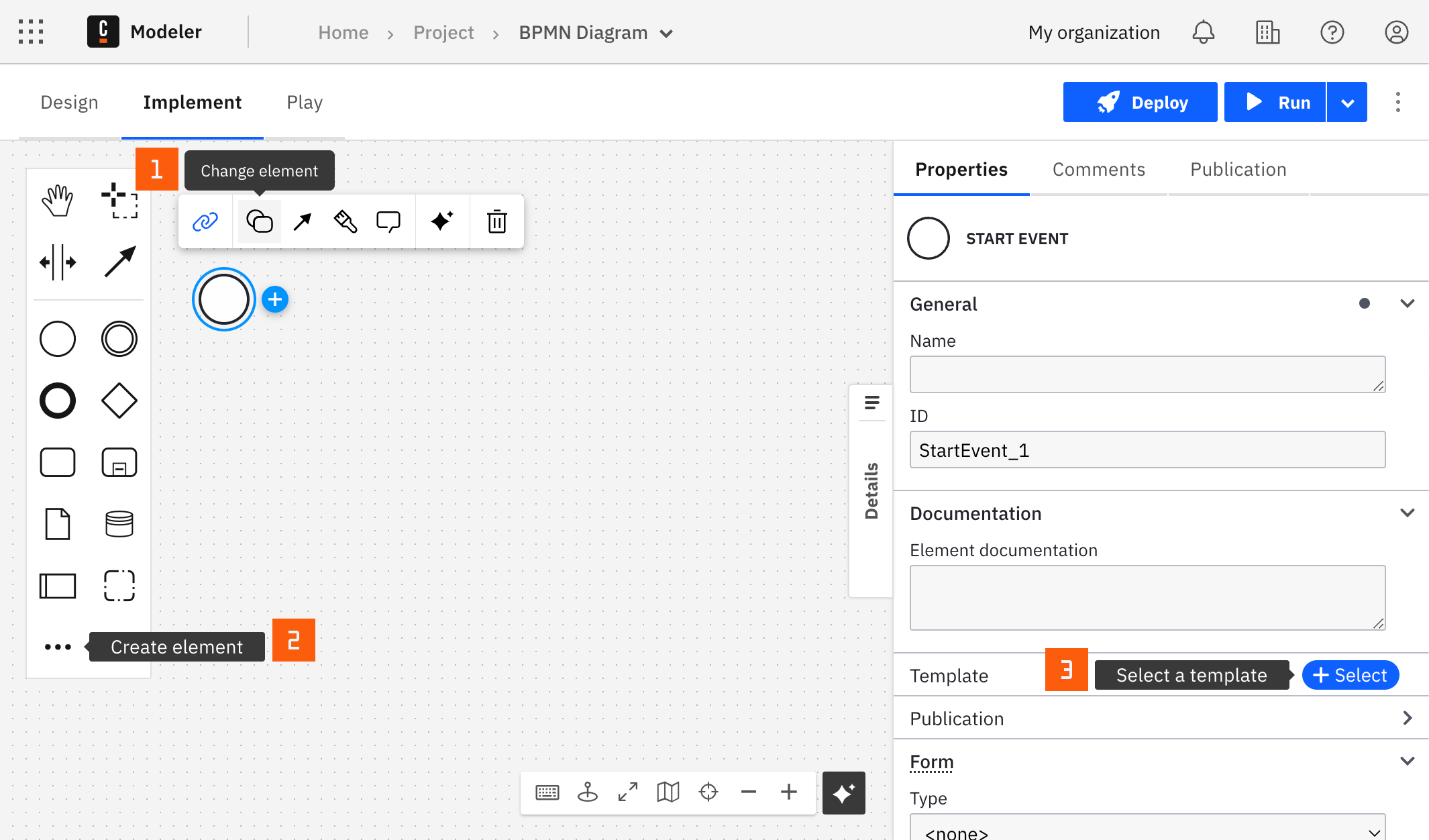
After you have applied a connector to your element, follow the configuration steps or see using connectors to learn more.
Configuration
Authentication
| Property | Type | Required | Description | Example |
|---|---|---|---|---|
| Authentication | Dropdown | Yes | The AWS authentication strategy:
| |
| Access key | String | Yes, if Authentication is Credentials | The access key of an IAM user with permission to receive messages from the queue. | {{secrets.MY_AWS_ACCESS_KEY}} |
| Secret key | String | Yes, if Authentication is Credentials | The secret key of the IAM user with the access key above. |
Queue
| Property | Type | Required | Description | Example |
|---|---|---|---|---|
| Region | String | Yes | The AWS region of the queue. | us-east-1 |
| Queue URL | String | Yes | The URL of the SQS queue to subscribe to. |
Message polling
| Property | Type | Required | Description | Example |
|---|---|---|---|---|
| Polling wait time | String | Yes | The duration, in seconds, for which the call waits for a message to arrive in the queue before it returns. The default is 20. A value of 0 is overridden with 1 at runtime. Learn more about short and long polling in the Amazon SQS Developer Guide. | |
| Attribute names | String | No | An array of queue attribute names to return in the attributes field of the message. If you leave it empty, all attributes are returned. | ["ApproximateReceiveCount"] |
| Message attribute names | String | No | An array of message attribute names to return in the messageAttributes field of the message. If you leave it empty, all message attributes are returned. Learn more about message metadata in the Amazon SQS Developer Guide. | ["attributeName1"] |
Activation
| Property | Type | Required | Description | Example |
|---|---|---|---|---|
| Activation condition | String | No | A FEEL expression evaluated against the message. The connector only triggers when it evaluates to true. Leave it empty to trigger for all messages. Learn more about the activation condition. | =(messageAttributes.key.stringValue="value") |
| Consume unmatched events | Boolean | No | Whether to delete messages that do not match the activation condition from the queue. See unmatched messages. It is selected by default. |
Unmatched messages
When Consume unmatched events is cleared, messages that do not match the Activation condition are not deleted from the queue. They become available to consumers again after the visibility timeout expires. To forward them after a number of delivery attempts, set up a dead-letter queue on the queue.
When Consume unmatched events is selected, the connector deletes messages that do not match the activation condition from the queue. These messages then do not end up in the dead-letter queue.
| Consume unmatched events | Activation condition | Outcome |
|---|---|---|
| Selected | Matched | Message is removed from the queue. |
| Cleared | Matched | Message is removed from the queue. |
| Selected | Unmatched | Message is removed from the queue. |
| Cleared | Unmatched | Message is not removed from the queue and is redelivered or placed in the dead-letter queue. |
Correlation
| Property | Type | Required | Description | Example |
|---|---|---|---|---|
| Subprocess correlation required | Dropdown | Yes, for message start events | Whether correlation is required: Correlation not required or Correlation required. Select Correlation required for message start events in an event-based sub-process. | |
| Correlation key (process) | String | Yes. For message start events, only if Subprocess correlation required is Correlation required. | A FEEL expression that defines the correlation key for the subscription. Learn more about the correlation key (process). | =4567 |
| Correlation key (payload) | String | Yes. For message start events, only if Subprocess correlation required is Correlation required. | A FEEL expression that extracts the correlation key from the incoming message. Learn more about the correlation key (payload). | =body.id |
| Message ID expression | String | No | A FEEL expression that extracts a unique identifier from the incoming message. Learn more about the message ID expression. | =body.transactionId |
| Message TTL | String | No | The time-to-live of the correlated message, as an ISO 8601 duration. It defines how long Zeebe buffers the message if it cannot be correlated immediately. Learn more about message buffering. | PT1H |
| Message name | String | No | The name of the message. By default, a random UUID is generated. Use a unique message name for each connector element in the diagram. Learn more about message subscriptions. |
Deduplication
| Property | Type | Required | Description | Example |
|---|---|---|---|---|
| Manual mode | Boolean | No | Customize the deduplication ID instead of using the automatic deduplication. By default, connector elements with the same subscription properties share one subscription. Learn more about inbound connector deduplication. | |
| Deduplication ID | String | Yes, if Manual mode is set | The custom deduplication ID. It can only contain alphanumeric characters, dashes, and underscores. |
Output
The connector provides the SQS message as the response. The body is parsed as JSON if possible, otherwise it contains the raw string. For example, a message with a JSON body looks as follows:
{
  "messageId": "12345",
  "receiptHandle": "ABCDE",
  "mD5OfBody": "1c6bb59997376e5182a88a6f582cd92a",
  "body": {
    "id": 4567,
    "value": "Hello world"
  },
  "attributes": {
    "ApproximateReceiveCount": "1",
    "SentTimestamp": "1703062074171",
    "SenderId": "333293239507",
    "ApproximateFirstReceiveTimestamp": "1703062074185"
  },
  "messageAttributes": {
    "messageName": {
      "stringValue": "myProcess",
      "binaryValue": null,
      "stringListValues": [],
      "binaryListValues": [],
      "dataType": "String"
    }
  },
  "mD5OfMessageAttributes": "9de691a346c79e4fda4af06248aa9dfc"
}
Use Result variable to store the entire message in a process variable, or Result expression to map fields into separate process variables. For example, to store the entire body in resultBody, the ID from the body in bodyId, and the message ID in messageId, use:
= {resultBody: body, bodyId: body.id, messageId: messageId}
Use the same message to define the correlation and the activation condition. With the message above:
- Correlation key (process):
=4567 - Correlation key (payload):
=body.id - Activation condition:
=messageAttributes.messageName.stringValue="myProcess"
Learn more about variable and response mapping.
Troubleshooting
To learn about general error handling in Camunda, see BPMN errors and failing jobs.