Build a custom connector
Can't find the connector you need? Build your own custom connector using connector templates or the SDK.
Camunda supports two main ways to build custom connectors:
- Connector templates for creating custom connectors based on existing built-in connectors, such as REST or gRPC.
- Connector SDK for building your own Java-based connectors from scratch.
Choose the approach that best fits your requirements and technical expertise. This guide provides an overview of both methods to help you get started.
Understand the connector architecture
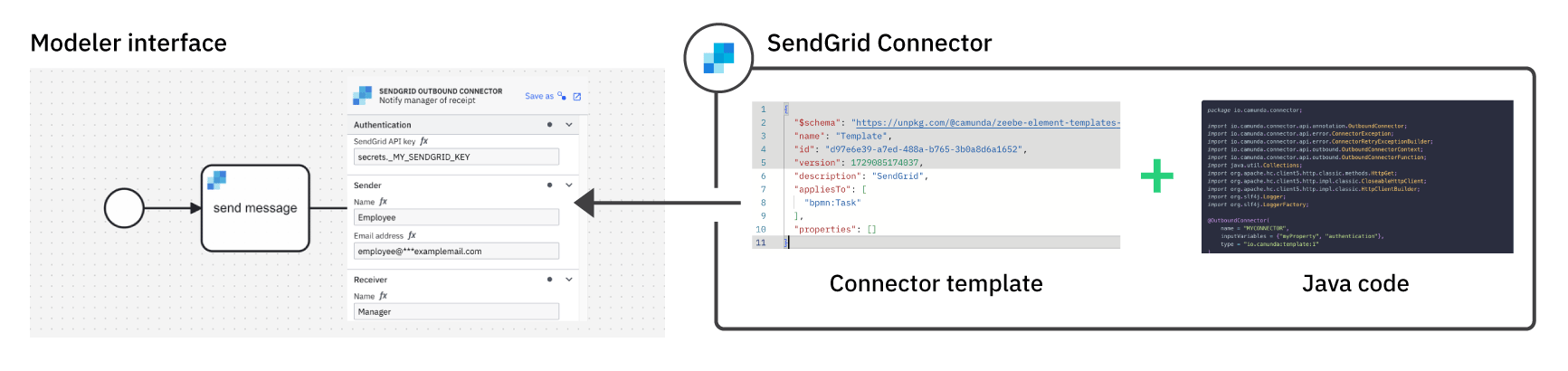
A connector consists of the Java backend and an element template that defines the Modeler user interface.
-
The Java code defines the connector’s functionality and how it interacts with an external system. For example, the Connector function used for outbound connectors.
-
The user interface allows you to configure and use the connector in Modeler. This is defined in a Connector template that controls how the BPMN element is shown in Modeler and which configuration options are available for the connector.
This separation enables a layered approach to building connectors. You can customize the user interface and configuration options in Modeler using connector templates, without modifying the underlying Java code.
Choose your approach
Decide which of the following scenarios best describes your use case.
Protocol-based API call
You need to call an API that uses a common protocol such as REST, SOAP, or GraphQL. There is no existing connector on Camunda marketplace that meets your needs.
Camunda recommends using a custom connector template based on the REST connector, SOAP connector, or GraphQL connector. This approach allows you to leverage the existing functionality while customizing it to fit your API requirements.
See Create a custom REST connector for more information.
Complex integration logic
You need to implement integration logic that goes beyond issuing an API call.
Build a custom connector using the Connector SDK. This approach gives you full control over the connector's behavior.
Connector templates
Connectors use connector templates to customize how a BPMN element is shown, and how it can be configured by process developers. Connector templates are a specific type of element template.

Connector templates
Create a connector task and start using connector secrets.

Generate a connector template
Automatically generate a custom connector template in Web Modeler.

Manage connector templates
Create and manage connector templates in a Web Modeler project.
